mirror of
https://github.com/speed47/spectre-meltdown-checker.git
synced 2026-09-30 22:50:43 +02:00
Compare commits
572
Commits
v0.01
..
3a822fdcf2
| Author | SHA1 | Date | |
|---|---|---|---|
 Stéphane Lesimple Stéphane Lesimple
|
3a822fdcf2 | ||
 speed47 speed47
|
61cc0f3a35 | ||
|
Stéphane Lesimple
|
a20641fbad | ||
|
Stéphane Lesimple
|
d550ea8c85 | ||
|
Stéphane Lesimple
|
8e33a1dbf2 | ||
|
speed47
|
68b4617fd4 | ||
|
speed47
|
9fed5ceb33 | ||
|
Stéphane Lesimple
|
72bce72fe8 | ||
|
Stéphane Lesimple
|
5f18e67f6f | ||
 Gabriel Francisco Gabriel Francisco
|
a8466b74fe | ||
|
speed47
|
b99be2363c | ||
|
Stéphane Lesimple
|
ee4cfd00b8 | ||
|
Stéphane Lesimple
|
c2c60e0161 | ||
 Jörg Sommer Jörg Sommer
|
bae43d8370 | ||
|
Stéphane Lesimple
|
34c6095912 | ||
|
Stéphane Lesimple
|
e806e4bc41 | ||
 Ivan Zahariev Ivan Zahariev
|
388d44edbd | ||
|
Stéphane Lesimple
|
bd0c7c94b5 | ||
|
Stéphane Lesimple
|
d70e4c2974 | ||
|
Stéphane Lesimple
|
4e29fb5a21 | ||
 Stephane Lesimple Stephane Lesimple
|
0f2edb1a71 | ||
|
Stephane Lesimple
|
8ac2539a2a | ||
|
Stéphane Lesimple
|
97f4d5f2bc | ||
|
Stéphane Lesimple
|
9b7b09ada3 | ||
 Sébastien Mériot Sébastien Mériot
|
c94811e63d | ||
|
Sébastien Mériot
|
3e67047c73 | ||
|
Sébastien Mériot
|
ecee75716e | ||
|
Sébastien Mériot
|
fb6933dc64 | ||
|
Stéphane Lesimple
|
dc6921a1ac | ||
|
Sébastien Mériot
|
3167762cfd | ||
|
Stéphane Lesimple
|
44223c5308 | ||
|
Stéphane Lesimple
|
dbe208fc48 | ||
|
Stéphane Lesimple
|
aca4e2a9b1 | ||
|
Sébastien Mériot
|
c1c1ac4dbb | ||
|
Stéphane Lesimple
|
ba0daa6769 | ||
|
Sébastien Mériot
|
227c0aab1e | ||
|
Stéphane Lesimple
|
8ba3751cf7 | ||
|
Stéphane Lesimple
|
d013c0a7d2 | ||
|
Stéphane Lesimple
|
cbe8ba10ce | ||
|
Stéphane Lesimple
|
9c2587bca5 | ||
|
Stéphane Lesimple
|
2a5ddc87bf | ||
|
Stéphane Lesimple
|
2ef6c1c80e | ||
|
Stéphane Lesimple
|
3c224018f4 | ||
|
Stéphane Lesimple
|
b8f8c81d51 | ||
|
Stéphane Lesimple
|
f34dd5fa7b | ||
|
Stéphane Lesimple
|
c0869d7341 | ||
|
Stéphane Lesimple
|
e99a548dcc | ||
|
Stéphane Lesimple
|
3d475dfaec | ||
|
Stéphane Lesimple
|
cba5010c2a | ||
|
Stéphane Lesimple
|
c5661f098f | ||
|
Stéphane Lesimple
|
6844c01242 | ||
 ShadowCurse ShadowCurse
|
0811f28ac6 | ||
|
Stéphane Lesimple
|
9bb79a18eb | ||
 George Cherian George Cherian
|
0d93c6ffb4 | ||
|
Stéphane Lesimple
|
6a61df200e | ||
|
ShadowCurse
|
e4b313fe79 | ||
|
Stéphane Lesimple
|
a2843575be | ||
 Hilton Chain Hilton Chain
|
60c71ccb7a | ||
|
Stéphane Lesimple
|
48abeb5950 | ||
|
Stéphane Lesimple
|
3c988cc73a | ||
 glitsj16 glitsj16
|
bea5cfc3b8 | ||
|
Stéphane Lesimple
|
b68ebe67f2 | ||
|
Stéphane Lesimple
|
a6c943d38f | ||
|
Stéphane Lesimple
|
dd162301ff | ||
|
Stéphane Lesimple
|
5f6471d9a4 | ||
|
Stéphane Lesimple
|
2a5b965b98 | ||
|
Stéphane Lesimple
|
ee266d43b7 | ||
|
Stéphane Lesimple
|
b61baa90df | ||
|
Stéphane Lesimple
|
a98d92f8bc | ||
|
Stéphane Lesimple
|
b7c8c4115a | ||
|
Stéphane Lesimple
|
4e7c52767d | ||
|
Stéphane Lesimple
|
8473d9ba6b | ||
|
Stéphane Lesimple
|
0af4830224 | ||
|
Stéphane Lesimple
|
81a4329d71 | ||
|
Stéphane Lesimple
|
3679776f3c | ||
|
Stéphane Lesimple
|
ba131fcd2f | ||
|
Stéphane Lesimple
|
ae6bc31c2c | ||
|
Stéphane Lesimple
|
6d7a6b3666 | ||
|
Stéphane Lesimple
|
16f2160be5 | ||
 Aditya-Tolikar Aditya-Tolikar
|
7cad9301b3 | ||
|
Stéphane Lesimple
|
580549812a | ||
|
Stéphane Lesimple
|
a485c7882a | ||
|
Stéphane Lesimple
|
7d13f7a0ef | ||
|
Stéphane Lesimple
|
226b2375ab | ||
|
Stéphane Lesimple
|
052a3e66d1 | ||
|
Stéphane Lesimple
|
05d862709d | ||
|
Stéphane Lesimple
|
3846913899 | ||
|
Stéphane Lesimple
|
a87ace1f98 | ||
|
Stéphane Lesimple
|
0ba71a443e | ||
|
Stéphane Lesimple
|
3a486e9985 | ||
|
Stéphane Lesimple
|
23564cda5d | ||
|
Stéphane Lesimple
|
0ea21d09bd | ||
|
Stéphane Lesimple
|
08e30e156d | ||
 Zhiyuan Dai Zhiyuan Dai
|
6d35e780f4 | ||
|
Stéphane Lesimple
|
4ec3154be0 | ||
|
Stéphane Lesimple
|
843f26630d | ||
|
Stéphane Lesimple
|
7fc2ec65b9 | ||
|
Stéphane Lesimple
|
c8cdfd54da | ||
|
Stéphane Lesimple
|
f0c33c7a32 | ||
|
Stéphane Lesimple
|
9e874397da | ||
|
Stéphane Lesimple
|
76cb73f3cb | ||
|
Stéphane Lesimple
|
90f23d286e | ||
|
Stéphane Lesimple
|
e41e311a7f | ||
|
Stéphane Lesimple
|
1f75f01630 | ||
|
Stéphane Lesimple
|
14a53b19da | ||
|
Stéphane Lesimple
|
d8f0ddd7a5 | ||
 Agata Gruza Agata Gruza
|
62d3448a54 | ||
|
Stéphane Lesimple
|
cb6d139629 | ||
|
Stéphane Lesimple
|
7e2db09ed9 | ||
|
Stéphane Lesimple
|
33cf1cde79 | ||
|
Stéphane Lesimple
|
4a3006e196 | ||
|
Stéphane Lesimple
|
36f98eff95 | ||
 xaitax xaitax
|
fa7b8f9567 | ||
|
Stéphane Lesimple
|
3beefc2587 | ||
|
Stéphane Lesimple
|
27c36fdb80 | ||
 Matt Christian Matt Christian
|
3d21dae168 | ||
|
Stéphane Lesimple
|
7d2a510146 | ||
|
Stéphane Lesimple
|
a1a35c9b35 | ||
|
Stéphane Lesimple
|
eec77e1ab9 | ||
|
Stéphane Lesimple
|
5633d374de | ||
|
Stéphane Lesimple
|
a343bccb49 | ||
|
Stéphane Lesimple
|
1f604c119b | ||
|
Stéphane Lesimple
|
bfed3187a6 | ||
|
Stéphane Lesimple
|
0cd7e1164f | ||
|
Stéphane Lesimple
|
71129d6b48 | ||
|
Stéphane Lesimple
|
6e799e8b01 | ||
|
Stéphane Lesimple
|
4993b04922 | ||
|
Stéphane Lesimple
|
4fc2afe1bc | ||
|
Stéphane Lesimple
|
bd47275501 | ||
|
Stéphane Lesimple
|
8ddf6b2d6d | ||
|
Stéphane Lesimple
|
16b6490ffc | ||
|
Stéphane Lesimple
|
18df38fae6 | ||
|
Stéphane Lesimple
|
a306757c22 | ||
|
Stéphane Lesimple
|
e01f97ee75 | ||
|
Stéphane Lesimple
|
fa7f814f4f | ||
|
Stéphane Lesimple
|
bb32a16a86 | ||
|
Stéphane Lesimple
|
8c84c0ba17 | ||
|
Stéphane Lesimple
|
6abe1bc62b | ||
|
Stéphane Lesimple
|
5ca7fe91ff | ||
|
Stéphane Lesimple
|
4ba68fba74 | ||
|
Stéphane Lesimple
|
59ad312773 | ||
|
Stéphane Lesimple
|
418533c47e | ||
|
Stéphane Lesimple
|
3e757b6177 | ||
|
Stéphane Lesimple
|
f724f94085 | ||
|
Stéphane Lesimple
|
dcf540888d | ||
|
Stéphane Lesimple
|
9911c243b2 | ||
|
Stéphane Lesimple
|
cb279a49ec | ||
|
Stéphane Lesimple
|
c100ce4c0d | ||
|
Stéphane Lesimple
|
4741b06160 | ||
|
Stéphane Lesimple
|
e0a1c2ec77 | ||
|
Agata Gruza
|
c18b88d745 | ||
|
Agata Gruza
|
d623524342 | ||
|
Stéphane Lesimple
|
f5ec320fe5 | ||
|
Stéphane Lesimple
|
cc224c0522 | ||
 Corey Wright Corey Wright
|
0518604fe6 | ||
 Erik Zettel Erik Zettel
|
d57fecec91 | ||
|
Stéphane Lesimple
|
f835f4d07d | ||
|
Agata Gruza
|
482d6c200a | ||
 David Guglielmi David Guglielmi
|
91d0699029 | ||
|
Stéphane Lesimple
|
fcc4ff4de2 | ||
|
Stéphane Lesimple
|
0bd38ddda0 | ||
|
Stéphane Lesimple
|
e83dc818cd | ||
|
Stéphane Lesimple
|
d69ea67101 | ||
|
Stéphane Lesimple
|
dfe0d10f2a | ||
|
Stéphane Lesimple
|
58a5acfdbb | ||
|
Stéphane Lesimple
|
ccb4dbef7c | ||
|
Stéphane Lesimple
|
afbb26277f | ||
|
Stéphane Lesimple
|
77b34d48c6 | ||
|
Stéphane Lesimple
|
497efe6a82 | ||
|
Stéphane Lesimple
|
62b46df4e7 | ||
|
Stéphane Lesimple
|
7d1f269bed | ||
 Erich Ritz Erich Ritz
|
4f9ca803c8 | ||
|
Stéphane Lesimple
|
5788cec18b | ||
|
Stéphane Lesimple
|
ae56ec0bc5 | ||
|
Stéphane Lesimple
|
871443c9db | ||
|
Stéphane Lesimple
|
8fd4e3ab01 | ||
|
Stéphane Lesimple
|
de793a7204 | ||
|
Stéphane Lesimple
|
11790027d3 | ||
|
Stéphane Lesimple
|
5939c38c5c | ||
|
Stéphane Lesimple
|
db7d3206fd | ||
|
Stéphane Lesimple
|
1d13a423b8 | ||
|
Agata Gruza
|
8e870db4f5 | ||
|
Stéphane Lesimple
|
d547ce4ab4 | ||
|
Stéphane Lesimple
|
d187827841 | ||
 Hans-Joachim Kliemeck Hans-Joachim Kliemeck
|
2e304ec617 | ||
|
Stéphane Lesimple
|
fcc04437e8 | ||
|
Stéphane Lesimple
|
d31a9810e6 | ||
|
Stéphane Lesimple
|
4edb867def | ||
|
Stéphane Lesimple
|
1264b1c7a3 | ||
|
Stéphane Lesimple
|
7beca1ac50 | ||
 David David
|
8ad10e15d3 | ||
|
Stéphane Lesimple
|
bfa4de96e6 | ||
|
Stéphane Lesimple
|
b022b27a51 | ||
 Dario Faggioli Dario Faggioli
|
c4bae6ee6a | ||
|
Stéphane Lesimple
|
23e7db044e | ||
|
Stéphane Lesimple
|
fc4981bb94 | ||
 Dajiang Zhong Dajiang Zhong
|
419508758e | ||
|
Stéphane Lesimple
|
d7d2e6934b | ||
 Jan Jan
|
b0083d918e | ||
 Lily Wilson Lily Wilson
|
904a83c675 | ||
 Rob Gill Rob Gill
|
906f54cf9d | ||
 Brett T. Warden Brett T. Warden
|
c45a06f414 | ||
|
Brett T. Warden
|
4a6fa070a4 | ||
|
Stéphane Lesimple
|
c705afe764 | ||
 Stanislav Kholmanskikh Stanislav Kholmanskikh
|
401ccd4b14 | ||
|
Stanislav Kholmanskikh
|
55120839dd | ||
|
Stéphane Lesimple
|
f5106b3c02 | ||
|
Stéphane Lesimple
|
68289dae1e | ||
|
Stéphane Lesimple
|
3b2d529654 | ||
|
Stéphane Lesimple
|
cbb18cb6b6 | ||
|
Stéphane Lesimple
|
299103a3ae | ||
|
Stéphane Lesimple
|
dc5402b349 | ||
|
Stéphane Lesimple
|
90c2ae5de2 | ||
 Michael Lass Michael Lass
|
53d6a44754 | ||
|
Stéphane Lesimple
|
297d890ce9 | ||
|
Stéphane Lesimple
|
0252e74f94 | ||
 Nicolas Sauzede Nicolas Sauzede
|
fbbb19f244 | ||
|
Stéphane Lesimple
|
1571a56ce2 | ||
|
Stéphane Lesimple
|
3cf9141601 | ||
|
Stéphane Lesimple
|
bff38f1b26 | ||
|
Stéphane Lesimple
|
b419fe7c63 | ||
 alexvong1995 alexvong1995
|
f193484a4a | ||
 Laszlo Toth Laszlo Toth
|
349d77b3b6 | ||
|
Stéphane Lesimple
|
e589ed7f02 | ||
|
Stéphane Lesimple
|
ae1206288f | ||
|
Stéphane Lesimple
|
b44d2b5470 | ||
|
Stéphane Lesimple
|
7b72c20f89 | ||
 Luis Ponce Luis Ponce
|
b48b2177b7 | ||
 Pierre Gaxatte Pierre Gaxatte
|
8f31634df6 | ||
|
Luis Ponce
|
96798b1932 | ||
|
Stéphane Lesimple
|
687ce1a7fa | ||
|
Stéphane Lesimple
|
80e0db7cc4 | ||
|
David Guglielmi
|
e8890ffac6 | ||
|
Stéphane Lesimple
|
b2f64e1132 | ||
 unrealization unrealization
|
42a3a61f1d | ||
 Karsten Weiss Karsten Weiss
|
afb36c519d | ||
|
Stéphane Lesimple
|
0009c0d473 | ||
|
Stéphane Lesimple
|
dd67fd94d7 | ||
|
Stéphane Lesimple
|
339ad31757 | ||
|
Stéphane Lesimple
|
794c5be1d2 | ||
|
Stéphane Lesimple
|
a7afc585a9 | ||
|
Stéphane Lesimple
|
fc1dffd09a | ||
|
Stéphane Lesimple
|
e942616189 | ||
|
Stéphane Lesimple
|
360be7b35f | ||
|
Stéphane Lesimple
|
5f59257826 | ||
|
Stéphane Lesimple
|
92d59cbdc1 | ||
|
Stéphane Lesimple
|
4747b932e7 | ||
|
Stéphane Lesimple
|
860023a806 | ||
|
Stéphane Lesimple
|
ab67a9221d | ||
 0x9fff00 0x9fff00
|
f4592bf3a8 | ||
|
Stéphane Lesimple
|
be15e47671 | ||
 Nathan Parsons Nathan Parsons
|
d3481d9524 | ||
|
Stéphane Lesimple
|
21af561148 | ||
|
Stéphane Lesimple
|
cb740397f3 | ||
|
Stéphane Lesimple
|
84195689af | ||
|
Stéphane Lesimple
|
b637681fa8 | ||
|
Stéphane Lesimple
|
9316c30577 | ||
|
Lily Wilson
|
f9dd9d8cb9 | ||
|
Stéphane Lesimple
|
0f0d103a89 | ||
|
Stéphane Lesimple
|
b262c40541 | ||
|
Stéphane Lesimple
|
cc2910fbbc | ||
 manish jaggi manish jaggi
|
30c4a1f6d2 | ||
|
Stéphane Lesimple
|
cf06636a3f | ||
|
Stéphane Lesimple
|
60077c8d12 | ||
|
Rob Gill
|
c181978d7c | ||
|
Jan
|
9a6406a9a2 | ||
|
Rob Gill
|
5962d20ba7 | ||
|
Rob Gill
|
17a3488505 | ||
|
Stéphane Lesimple
|
e54e8b3e84 | ||
|
Stéphane Lesimple
|
39c778e3ac | ||
|
Stéphane Lesimple
|
2cde6e4649 | ||
|
Stéphane Lesimple
|
f4d51e7e53 | ||
|
Stéphane Lesimple
|
85d46b2799 | ||
|
Stéphane Lesimple
|
61e02abd0c | ||
|
Stéphane Lesimple
|
114756fab7 | ||
|
Rob Gill
|
ea75969eb7 | ||
|
Stéphane Lesimple
|
ca391cbfc9 | ||
|
Stéphane Lesimple
|
68af5c5f92 | ||
|
Stéphane Lesimple
|
19be8f79eb | ||
|
Stéphane Lesimple
|
f75cc0bb6f | ||
|
Stéphane Lesimple
|
f33d65ff71 | ||
|
Stéphane Lesimple
|
725eaa8bf5 | ||
|
Stéphane Lesimple
|
c6ee0358d1 | ||
|
Stéphane Lesimple
|
22d0b203da | ||
|
Stéphane Lesimple
|
3062a8416a | ||
|
Stéphane Lesimple
|
6a4318addf | ||
|
Stéphane Lesimple
|
c19986188f | ||
|
Rob Gill
|
7e4899bcb8 | ||
 rrobgill rrobgill
|
5cc77741af | ||
|
rrobgill
|
1c0f6d9580 | ||
 Onno Zweers Onno Zweers
|
4acd0f647a | ||
|
Stéphane Lesimple
|
fb52dbe7bf | ||
|
Stéphane Lesimple
|
edebe4dcd4 | ||
|
Stéphane Lesimple
|
83ea78f523 | ||
|
Stéphane Lesimple
|
602b68d493 | ||
|
Stéphane Lesimple
|
97bccaa0d7 | ||
|
Stéphane Lesimple
|
68e619b0d3 | ||
|
Stéphane Lesimple
|
a6f4475cee | ||
|
Stéphane Lesimple
|
223f5028df | ||
|
Stéphane Lesimple
|
c0108b9690 | ||
|
Stéphane Lesimple
|
a3016134bd | ||
|
Stéphane Lesimple
|
59d85b39c9 | ||
|
Stéphane Lesimple
|
baaefb0c31 | ||
 Igor Lubashev Igor Lubashev
|
d452aca03a | ||
|
Stéphane Lesimple
|
10b8d94724 | ||
|
Stéphane Lesimple
|
8606e60ef7 | ||
|
Stéphane Lesimple
|
6a48251647 | ||
|
Stéphane Lesimple
|
f4bf5e95ec | ||
|
Stéphane Lesimple
|
60eac1ad43 | ||
|
Stéphane Lesimple
|
b3cc06a6ad | ||
|
Stéphane Lesimple
|
5553576e31 | ||
|
Stéphane Lesimple
|
e16ad802da | ||
|
Stéphane Lesimple
|
29c294edff | ||
|
Stéphane Lesimple
|
59714011db | ||
|
Stéphane Lesimple
|
51e8261a32 | ||
|
Stéphane Lesimple
|
2a4bfad835 | ||
|
Stéphane Lesimple
|
7e52cea66e | ||
 Benjamin Bouvier Benjamin Bouvier
|
417d7aab91 | ||
 Sylvestre Ledru Sylvestre Ledru
|
67bf761029 | ||
|
Stéphane Lesimple
|
0eabd266ad | ||
|
Stéphane Lesimple
|
b77fb0f226 | ||
|
Stéphane Lesimple
|
89c2e0fb21 | ||
|
Stéphane Lesimple
|
b88f32ed95 | ||
|
Stéphane Lesimple
|
7a4ebe8009 | ||
|
Stéphane Lesimple
|
0919f5c236 | ||
|
Stéphane Lesimple
|
de02dad909 | ||
|
Stéphane Lesimple
|
07484d0ea7 | ||
|
Stéphane Lesimple
|
a8b557b9e2 | ||
|
Stéphane Lesimple
|
619b2749d8 | ||
|
Stéphane Lesimple
|
94857c983d | ||
|
Stéphane Lesimple
|
056ed00baa | ||
|
Stéphane Lesimple
|
aef99d20f3 | ||
|
Stéphane Lesimple
|
e2d7ed2243 | ||
|
Stéphane Lesimple
|
eeaeff8ec3 | ||
|
Stéphane Lesimple
|
f5269a362a | ||
|
Stéphane Lesimple
|
f3883a37a0 | ||
|
Stéphane Lesimple
|
b6fd69a022 | ||
|
Stéphane Lesimple
|
7adb7661f3 | ||
|
Stéphane Lesimple
|
c7892e3399 | ||
|
Stéphane Lesimple
|
aa74315df4 | ||
|
Stéphane Lesimple
|
0b8a09ec70 | ||
|
Stéphane Lesimple
|
b42d8f2f27 | ||
|
Stéphane Lesimple
|
f191ec7884 | ||
|
Stéphane Lesimple
|
28da7a0103 | ||
|
Stéphane Lesimple
|
ece25b98a1 | ||
|
Stéphane Lesimple
|
889172dbb1 | ||
|
Stéphane Lesimple
|
37ce032888 | ||
|
Stéphane Lesimple
|
701cf882ad | ||
|
Stéphane Lesimple
|
6a94c3f158 | ||
|
Stéphane Lesimple
|
2d993812ab | ||
|
Stéphane Lesimple
|
4961f8327f | ||
 Alex Alex
|
ecdc448531 | ||
|
Stéphane Lesimple
|
12ea49fe0c | ||
|
Stéphane Lesimple
|
053f1613de | ||
|
Stéphane Lesimple
|
bda18d04a0 | ||
|
Stéphane Lesimple
|
2551295541 | ||
|
Stéphane Lesimple
|
d5832dc1dc | ||
|
Stéphane Lesimple
|
d2f46740e9 | ||
 Sam Morris Sam Morris
|
2f6a6554a2 | ||
|
Stéphane Lesimple
|
30842dd9c0 | ||
|
Stéphane Lesimple
|
b4ac5fcbe3 | ||
|
Stéphane Lesimple
|
fef380d66f | ||
|
Stéphane Lesimple
|
55a6fd3911 | ||
 Sylvestre Ledru Sylvestre Ledru
|
35c8a63de6 | ||
|
Stéphane Lesimple
|
5f914e555e | ||
|
Stéphane Lesimple
|
66dce2c158 | ||
 Calvin Walton Calvin Walton
|
155cac2102 | ||
|
Stéphane Lesimple
|
22cae605e1 | ||
|
Stéphane Lesimple
|
eb75e51975 | ||
 積丹尼 Dan Jacobson 積丹尼 Dan Jacobson
|
253e180807 | ||
|
Stéphane Lesimple
|
5d6102a00e | ||
|
Stéphane Lesimple
|
a2dfca671e | ||
|
Stéphane Lesimple
|
36bd80d75f | ||
|
Stéphane Lesimple
|
1834dd6201 | ||
|
Stéphane Lesimple
|
3d765bc703 | ||
|
Stéphane Lesimple
|
07afd95b63 | ||
|
Stéphane Lesimple
|
b7a10126d1 | ||
|
Stéphane Lesimple
|
6346a0deaa | ||
|
Stéphane Lesimple
|
8106f91981 | ||
|
Stéphane Lesimple
|
b1fdf88f28 | ||
|
Stéphane Lesimple
|
4d29607630 | ||
|
Stéphane Lesimple
|
0267659adc | ||
|
Stéphane Lesimple
|
247b176882 | ||
|
Stéphane Lesimple
|
bcae8824ec | ||
|
Stéphane Lesimple
|
71e7109c22 | ||
|
Stéphane Lesimple
|
aa18b51e1c | ||
|
Stéphane Lesimple
|
b738ac4bd7 | ||
|
Stéphane Lesimple
|
799ce3eb30 | ||
|
Stéphane Lesimple
|
f1e18c136f | ||
|
Stéphane Lesimple
|
e05ec5c85f | ||
|
Stéphane Lesimple
|
6e544d6055 | ||
|
Stéphane Lesimple
|
90a65965ff | ||
|
Stéphane Lesimple
|
9b53635eda | ||
 Joseph Mulloy Joseph Mulloy
|
7404929661 | ||
|
Stéphane Lesimple
|
bf46fd5d9b | ||
|
Stéphane Lesimple
|
0798bd4c5b | ||
|
Stéphane Lesimple
|
42094c4f8b | ||
|
Stéphane Lesimple
|
03d2dfe008 | ||
|
Stéphane Lesimple
|
9f00ffa5af | ||
 Matthieu Cerda Matthieu Cerda
|
7f0d80b305 | ||
|
Stéphane Lesimple
|
d1c1f0f0f0 | ||
|
Stéphane Lesimple
|
acf12a6d2d | ||
|
Stéphane Lesimple
|
b45e40bec8 | ||
|
Stéphane Lesimple
|
3c1d452c99 | ||
|
Stéphane Lesimple
|
53b9eda040 | ||
|
Stéphane Lesimple
|
3b0ec998b1 | ||
|
Stéphane Lesimple
|
d55bafde19 | ||
|
Stéphane Lesimple
|
147462c0ab | ||
|
Stéphane Lesimple
|
ddc7197b86 | ||
|
Stéphane Lesimple
|
e7aa3b9d16 | ||
|
Stéphane Lesimple
|
ff5c92fa6f | ||
|
Stéphane Lesimple
|
443d9a2ae9 | ||
|
Stéphane Lesimple
|
3e454f1817 | ||
|
Stéphane Lesimple
|
c8a25c5d97 | ||
|
Stéphane Lesimple
|
40381349ab | ||
|
Stéphane Lesimple
|
0aa5857a76 | ||
|
Stéphane Lesimple
|
b3b7f634e6 | ||
|
Stéphane Lesimple
|
263ef65fec | ||
|
Stéphane Lesimple
|
a1bd233c49 | ||
|
Stéphane Lesimple
|
de6590cd09 | ||
|
Stéphane Lesimple
|
56d4f82484 | ||
|
Stéphane Lesimple
|
7fa2d6347b | ||
|
Stéphane Lesimple
|
3be5e90481 | ||
|
Stéphane Lesimple
|
995620a682 | ||
|
Stéphane Lesimple
|
193e0d8d08 | ||
|
Stéphane Lesimple
|
72ef94ab3d | ||
 Harald Hoyer Harald Hoyer
|
ccc0453df7 | ||
|
Stéphane Lesimple
|
14ca49a042 | ||
|
Stéphane Lesimple
|
db357b8e25 | ||
|
Stéphane Lesimple
|
42a57dd980 | ||
|
Stéphane Lesimple
|
5ab95f3656 | ||
|
Stéphane Lesimple
|
5b6e39916d | ||
 Willy Sudiarto Raharjo Willy Sudiarto Raharjo
|
556951d5f0 | ||
|
Stéphane Lesimple
|
7a88aec95f | ||
|
Stéphane Lesimple
|
bd18323d79 | ||
|
Stéphane Lesimple
|
b89d67dd15 | ||
|
Stéphane Lesimple
|
704e54019a | ||
|
Stéphane Lesimple
|
d96093171a | ||
|
Stéphane Lesimple
|
dcc4488340 | ||
|
Stéphane Lesimple
|
32e3fe6c07 | ||
|
Stéphane Lesimple
|
f488947d43 | ||
|
Stéphane Lesimple
|
71213c11b3 | ||
 Andreas Rammhold Andreas Rammhold
|
2964c4ab44 | ||
|
Stéphane Lesimple
|
749f432d32 | ||
|
Stéphane Lesimple
|
a422b53d7c | ||
|
Stéphane Lesimple
|
c483a2cf60 | ||
|
Stéphane Lesimple
|
dead0054a4 | ||
|
Stéphane Lesimple
|
8ed7d465aa | ||
|
Stéphane Lesimple
|
e5e4851d72 | ||
|
Stéphane Lesimple
|
7f92717a2c | ||
|
Stéphane Lesimple
|
b47d505689 | ||
 Corey Hickey Corey Hickey
|
4a2d051285 | ||
 Sylvestre Ledru Sylvestre Ledru
|
f3551b9734 | ||
|
Sylvestre Ledru
|
45b98e125f | ||
|
Stéphane Lesimple
|
dce917bfbb | ||
|
Stéphane Lesimple
|
8f18f53aba | ||
 M. Willis Monroe M. Willis Monroe
|
d3f102b3b3 | ||
|
M. Willis Monroe
|
8bd093173d | ||
|
Stéphane Lesimple
|
bfe5a3b840 | ||
|
Stéphane Lesimple
|
6a0242eea3 | ||
|
Stéphane Lesimple
|
bc4e39038a | ||
|
Stéphane Lesimple
|
62f8ed6f61 | ||
 Gianluca Varisco Gianluca Varisco
|
56b67f8082 | ||
 Tobias Rüetschi Tobias Rüetschi
|
52a8f78885 | ||
|
Stéphane Lesimple
|
a09a5ba38f | ||
 Abdoul Bah Abdoul Bah
|
5a7d8d7edf | ||
|
Stéphane Lesimple
|
49fdc6c449 | ||
 Matt Cowan Matt Cowan
|
af3de2a862 | ||
|
Stéphane Lesimple
|
c6e1b0ac8a | ||
|
Stéphane Lesimple
|
b913dacc1b | ||
|
Stéphane Lesimple
|
eb0ebef5a8 | ||
|
Stéphane Lesimple
|
e0254025e8 | ||
|
Stéphane Lesimple
|
bd010340e6 | ||
|
Stéphane Lesimple
|
a658de2f01 | ||
|
Stéphane Lesimple
|
4aed5589fe | ||
|
Stéphane Lesimple
|
8ed1f5e3af | ||
|
Stéphane Lesimple
|
ffc542eb82 | ||
|
Stéphane Lesimple
|
74bc7ba637 | ||
|
Stéphane Lesimple
|
5389ac6844 | ||
|
Stéphane Lesimple
|
36fb83215a | ||
 Marcus Downing Marcus Downing
|
59fe8c2ad8 | ||
 Simon Vasseur Simon Vasseur
|
b8d28e7f61 | ||
|
Marcus Downing
|
7c11d07865 | ||
|
Marcus Downing
|
7c5cfbb8c3 | ||
|
Marcus Downing
|
381038eceb | ||
|
Stéphane Lesimple
|
d6e4aa43f0 | ||
|
Stéphane Lesimple
|
e5e09384f0 | ||
|
Stéphane Lesimple
|
7222367f04 | ||
|
Stéphane Lesimple
|
ab512687cf | ||
|
Stéphane Lesimple
|
a5aaa790a0 | ||
 Alkorin Alkorin
|
335439dee0 | ||
|
Alkorin
|
45297b6f7d | ||
 Frederic CORNU Frederic CORNU
|
a7b14306d5 | ||
|
Frederic CORNU
|
608952ff71 | ||
|
Stéphane Lesimple
|
1c3d349667 | ||
|
Stéphane Lesimple
|
b93b13263d | ||
 Vincent Brillault Vincent Brillault
|
ad342cab06 | ||
|
Vincent Brillault
|
5fd85e288b | ||
|
Stéphane Lesimple
|
322f4efc8f | ||
|
Vincent Brillault
|
b6bfcdbd45 | ||
|
Stéphane Lesimple
|
19b01078c2 | ||
|
Stéphane Lesimple
|
68961f98c2 | ||
|
Stéphane Lesimple
|
f0f2ea9b11 | ||
|
Stéphane Lesimple
|
6f1bdba1d9 | ||
|
Stéphane Lesimple
|
7b05105a54 | ||
|
Stéphane Lesimple
|
8aed2d4086 | ||
|
Vincent Brillault
|
f4140a992a | ||
|
Vincent Brillault
|
2c51b00a90 | ||
|
Stéphane Lesimple
|
2d94514c07 | ||
|
Stéphane Lesimple
|
0e8f97afbc | ||
|
Stéphane Lesimple
|
70323a30da | ||
 angus-p angus-p
|
cc0b325383 | ||
 Matthew Radcliffe Matthew Radcliffe
|
4454f03136 | ||
|
Stéphane Lesimple
|
949f316f89 | ||
|
Stéphane Lesimple
|
5082afae61 | ||
|
Stéphane Lesimple
|
d73a24cb5b | ||
|
Stéphane Lesimple
|
75332e6e0f | ||
 Grim Kriegor Grim Kriegor
|
2d33a4369e | ||
|
Stéphane Lesimple
|
8d4d295309 | ||
|
Stéphane Lesimple
|
1ff437edbb | ||
|
Stéphane Lesimple
|
34656827f5 | ||
|
Alkorin
|
8c8a8d35fd | ||
|
Alkorin
|
debd10b517 | ||
|
Alkorin
|
21f81ff5c9 | ||
|
Stéphane Lesimple
|
206e4b7fbc | ||
|
Alkorin
|
1a14483c98 | ||
|
Alkorin
|
26564206db | ||
|
Stéphane Lesimple
|
207168e097 | ||
|
Stéphane Lesimple
|
f8ca11e56a | ||
 Sebastian Wiesinger Sebastian Wiesinger
|
c88acdd31d | ||
|
Stéphane Lesimple
|
88df48f4a7 | ||
|
Sebastian Wiesinger
|
124ce8e27a | ||
|
Stéphane Lesimple
|
7bbcfe0df7 | ||
|
Vincent Brillault
|
a792348928 | ||
|
Vincent Brillault
|
66f7708095 | ||
|
Vincent Brillault
|
34ef5ef21b | ||
|
Stéphane Lesimple
|
edbdf0da1f | ||
|
Stéphane Lesimple
|
68adbfdf14 | ||
|
Alkorin
|
47c30babf1 | ||
|
Stéphane Lesimple
|
ef7a5c4cf6 | ||
|
Stéphane Lesimple
|
4406910bea | ||
|
Vincent Brillault
|
b7197d6f54 | ||
|
Stéphane Lesimple
|
c792fa35bf | ||
|
Stéphane Lesimple
|
d1498fe03f | ||
|
Stéphane Lesimple
|
12bdd0e412 | ||
|
Stéphane Lesimple
|
89f9bef577 | ||
 fccagou fccagou
|
0f50e04dab | ||
|
David Guglielmi
|
bf056ae73d | ||
|
Stéphane Lesimple
|
623e180ae1 | ||
 Frederik Schreiber Frederik Schreiber
|
40a9d43c44 | ||
|
Stéphane Lesimple
|
c1004d5171 | ||
|
Stéphane Lesimple
|
fa0850466e | ||
|
Stéphane Lesimple
|
5c14384e15 | ||
 Thibault Nélis Thibault Nélis
|
1aaca63dcf | ||
|
Stéphane Lesimple
|
96dfa03c00 | ||
|
Stéphane Lesimple
|
05c79425ab | ||
|
Stéphane Lesimple
|
9def0c949a | ||
|
Stéphane Lesimple
|
64eb1d005c | ||
|
Stéphane Lesimple
|
bffda8b3e7 | ||
|
Stéphane Lesimple
|
13f2133a97 | ||
|
Stéphane Lesimple
|
8c2fd0f0bb | ||
|
Stéphane Lesimple
|
761c2b80e4 | ||
|
Stéphane Lesimple
|
d6977928e5 | ||
|
Stéphane Lesimple
|
bd4c74331e | ||
|
Stéphane Lesimple
|
82972f8790 | ||
|
Stéphane Lesimple
|
30de4f6336 | ||
|
Stéphane Lesimple
|
9ed1fcd98a | ||
|
Stéphane Lesimple
|
ef7c0d7ec5 | ||
|
Stéphane Lesimple
|
3b760822ff | ||
|
Stéphane Lesimple
|
0201b02313 | ||
|
Stéphane Lesimple
|
c937e6603b | ||
|
Stéphane Lesimple
|
0c4591f8ec |
@@ -0,0 +1,34 @@
|
||||
name: autoupdate
|
||||
|
||||
on:
|
||||
workflow_dispatch:
|
||||
schedule:
|
||||
- cron: '42 9 * * *'
|
||||
|
||||
jobs:
|
||||
autoupdate:
|
||||
runs-on: ubuntu-latest
|
||||
steps:
|
||||
- uses: actions/checkout@v4
|
||||
- name: Install prerequisites
|
||||
run: sudo apt-get update && sudo apt-get install -y --no-install-recommends iucode-tool sqlite3 unzip
|
||||
- name: Update microcode versions
|
||||
run: ./spectre-meltdown-checker.sh --update-builtin-fwdb
|
||||
- name: Check git diff
|
||||
id: diff
|
||||
run: |
|
||||
echo change="$(git diff spectre-meltdown-checker.sh | awk '/MCEDB/ { if(V) { print V" to "$4; exit } else { V=$4 } }')" >> "$GITHUB_OUTPUT"
|
||||
echo nbdiff="$(git diff spectre-meltdown-checker.sh | grep -cE -- '^\+# [AI],')" >> "$GITHUB_OUTPUT"
|
||||
git diff
|
||||
cat "$GITHUB_OUTPUT"
|
||||
- name: Create Pull Request if needed
|
||||
if: steps.diff.outputs.nbdiff != '0'
|
||||
uses: peter-evans/create-pull-request@v7
|
||||
with:
|
||||
token: ${{ secrets.SMC_PR_PAT }}
|
||||
branch: autoupdate-fwdb
|
||||
commit-message: "update: fwdb from ${{ steps.diff.outputs.change }}, ${{ steps.diff.outputs.nbdiff }} microcode changes"
|
||||
title: "[Auto] Update fwdb from ${{ steps.diff.outputs.change }}"
|
||||
body: |
|
||||
Automated PR to update fwdb from ${{ steps.diff.outputs.change }}
|
||||
Detected ${{ steps.diff.outputs.nbdiff }} microcode changes
|
||||
@@ -0,0 +1,7 @@
|
||||
FROM alpine:latest
|
||||
|
||||
RUN apk --update --no-cache add kmod binutils grep perl zstd wget sharutils unzip sqlite procps coreutils iucode-tool gzip xz bzip2 lz4
|
||||
|
||||
COPY spectre-meltdown-checker.sh /
|
||||
|
||||
ENTRYPOINT ["/spectre-meltdown-checker.sh"]
|
||||
@@ -0,0 +1,145 @@
|
||||
# Questions
|
||||
|
||||
- [What to expect from this tool?](#what-to-expect-from-this-tool)
|
||||
- [Why was this script written in the first place?](#why-was-this-script-written-in-the-first-place)
|
||||
- [Why are those vulnerabilities so different than regular CVEs?](#why-are-those-vulnerabilities-so-different-than-regular-cves)
|
||||
- [What do "affected", "vulnerable" and "mitigated" mean exactly?](#what-do-affected-vulnerable-and-mitigated-mean-exactly)
|
||||
- [What are the main design decisions regarding this script?](#what-are-the-main-design-decisions-regarding-this-script)
|
||||
- [Everything is indicated in `sysfs` now, is this script still useful?](#everything-is-indicated-in-sysfs-now-is-this-script-still-useful)
|
||||
- [How does this script work?](#how-does-this-script-work)
|
||||
- [Which BSD OSes are supported?](#which-bsd-oses-are-supported)
|
||||
- [Why is my OS not supported?](#why-is-my-os-not-supported)
|
||||
- [The tool says there is an updated microcode for my CPU, but I don't have it!](#the-tool-says-there-is-an-updated-microcode-for-my-cpu-but-i-dont-have-it)
|
||||
- [The tool says that I need a more up-to-date microcode, but I have the more recent version!](#the-tool-says-that-i-need-a-more-up-to-date-microcode-but-i-have-the-more-recent-version)
|
||||
- [Which rules are governing the support of a CVE in this tool?](#which-rules-are-governing-the-support-of-a-cve-in-this-tool)
|
||||
|
||||
# Answers
|
||||
|
||||
## What to expect from this tool?
|
||||
|
||||
This tool does its best to determine where your system stands on each of the collectively named [transient execution](https://en.wikipedia.org/wiki/Transient_execution_CPU_vulnerability) vulnerabilities (also sometimes called "speculative execution" vulnerabilities) that were made public since early 2018. It doesn't attempt to run any kind of exploit, and can't guarantee that your system is secure, but rather helps you verifying if your system is affected, and if it is, checks whether it has the known mitigations in place to avoid being vulnerable.
|
||||
Some mitigations could also exist in your kernel that this script doesn't know (yet) how to detect, or it might falsely detect mitigations that in the end don't work as expected (for example, on backported or modified kernels).
|
||||
|
||||
Please also note that for Spectre vulnerabilities, all software can possibly be exploited, this tool only verifies that the kernel (which is the core of the system) you're using has the proper protections in place. Verifying all the other software is out of the scope of this tool. As a general measure, ensure you always have the most up to date stable versions of all the software you use, especially for those who are exposed to the world, such as network daemons and browsers.
|
||||
|
||||
This tool has been released in the hope that it'll be useful, but don't use it to jump to definitive conclusions about your security: hardware vulnerabilities are [complex beasts](#why-are-those-vulnerabilities-so-different-than-regular-cves), and collective understanding of each vulnerability is evolving with time.
|
||||
|
||||
## Why was this script written in the first place?
|
||||
|
||||
The first commit of this script is dated *2018-01-07*, only 4 days after the world first heard about the Meltdown and the Spectre attacks. With those attacks disclosure, a _whole new range of vulnerabilities_ that were previously thought to be mostly theoretical and only possible in very controlled environments (labs) - hence of little interest for most except researchers - suddenly became completely mainstream and apparently trivial to conduct on an immensely large number of systems.
|
||||
|
||||
On the few hours and days after that date, the whole industry went crazy. Proper, verified information about these vulnerabilities was incredibly hard to find, because before this, even the CPU vendors never had to deal with managing security vulnerabilities at scale, as software vendors do since decades. There were a lot of FUD, and the apparent silence of the vendors was enough for most to fear the worst. The whole industry had everything to learn about this new type of vulnerabilities. However, most systems administrators had a few simple questions:
|
||||
|
||||
- Am **I** vulnerable? And if yes,
|
||||
- What do I have to do to mitigate these vulnerabilities on **my** system?
|
||||
|
||||
Unfortunately, answering those questions was very difficult (and still is to some extent), even if the safe answer to the first question was "you probably are". This script was written to try to give simple answers to those simple questions, and was made to evolve as the information about these vulnerabilities became available. On the first few days, there was several new versions published **per day**.
|
||||
|
||||
## Why are those vulnerabilities so different than regular CVEs?
|
||||
|
||||
Those are hardware vulnerabilities, while most of the CVEs we see everyday are software vulnerabilities. A quick comparison would be:
|
||||
|
||||
Software vulnerability:
|
||||
- Can be fixed? Yes.
|
||||
- How to fix? Update the software (or uninstall it!)
|
||||
|
||||
Hardware vulnerability:
|
||||
- Can be fixed? No, only mitigated (or buy new hardware!)
|
||||
- How to ~~fix~~ mitigate? In the worst case scenario, 5 "layers" need to be updated: the microcode/firmware, the host OS kernel, the hypervisor, the VM OS kernel, and possibly all the software running on the machine. Sometimes only a subset of those layers need to be updated. In yet other cases, there can be several possible mitigations for the same vulnerability, implying different layers. Yes, it can get horribly complicated.
|
||||
|
||||
A more detailed video explanation is available here: https://youtu.be/2gB9U1EcCss?t=425
|
||||
|
||||
## What do "affected", "vulnerable" and "mitigated" mean exactly?
|
||||
|
||||
- **Affected** means that your CPU's hardware, as it went out of the factory, is known to be concerned by a specific vulnerability, i.e. the vulnerability applies to your hardware model. Note that it says nothing about whether a given vulnerability can actually be used to exploit your system. However, an unaffected CPU will never be vulnerable, and doesn't need to have mitigations in place.
|
||||
- **Vulnerable** implies that you're using an **affected** CPU, and means that a given vulnerability can be exploited on your system, because no (or insufficient) mitigations are in place.
|
||||
- **Mitigated** implies that a previously **vulnerable** system has followed all the steps (updated all the required layers) to ensure a given vulnerability cannot be exploited. About what "layers" mean, see [the previous question](#why-are-those-vulnerabilities-so-different-than-regular-cves).
|
||||
|
||||
## What are the main design decisions regarding this script?
|
||||
|
||||
There are a few rules that govern how this tool is written.
|
||||
|
||||
1) It should be okay to run this script in a production environment. This implies, but is not limited to:
|
||||
|
||||
* 1a. Never modify the system it's running on, and if it needs to e.g. load a kernel module it requires, that wasn't loaded before it was launched, it'll take care to unload it on exit
|
||||
* 1b. Never attempt to "fix" or "mitigate" any vulnerability, or modify any configuration. It just reports what it thinks is the status of your system. It leaves all decisions to the sysadmin.
|
||||
* 1c. Never attempt to run any kind of exploit to tell whether a vulnerability is mitigated, because it would violate 1a), could lead to unpredictable system behavior, and might even lead to wrong conclusions, as some PoC must be compiled with specific options and prerequisites, otherwise giving wrong information (especially for Spectre). If you want to run PoCs, do it yourself, but please read carefully about the PoC and the vulnerability. PoCs about a hardware vulnerability are way more complicated and prone to false conclusions than PoCs for software vulnerabilities.
|
||||
|
||||
2) Never look at the kernel version to tell whether it supports mitigation for a given vulnerability. This implies never hardcoding version numbers in the script. This would defeat the purpose: this script should be able to detect mitigations in unknown kernels, with possibly backported or forward-ported patches. Also, don't believe what `sysfs` says, when possible. See the next question about this.
|
||||
|
||||
3) Never look at the microcode version to tell whether it has the proper mechanisms in place to support mitigation for a given vulnerability. This implies never hardcoding version numbers in the script. Instead, look for said mechanisms, as the kernel would do.
|
||||
|
||||
4) When a CPU is not known to be explicitly unaffected by a vulnerability, make the assumption that it is. This strong design choice has it roots in the early speculative execution vulnerability days (see [this answer](#why-was-this-script-written-in-the-first-place)), and is still a good approach as of today.
|
||||
|
||||
## Everything is indicated in `sysfs` now, is this script still useful?
|
||||
|
||||
A lot as changed since 2018. Nowadays, the industry adapted and this range of vulnerabilities is almost "business as usual", as software vulnerabilities are. However, due to their complexity, it's still not as easy as just checking a version number to ensure a vulnerability is closed.
|
||||
|
||||
Granted, we now have a standard way under Linux to check whether our system is affected, vulnerable, mitigated against most of these vulnerabilities. By having a look at the `sysfs` hierarchy, and more precisely the `/sys/devices/system/cpu/vulnerabilities/` folder, one can have a pretty good insight about its system state for each of the listed vulnerabilities. Note that the output can be a little different with some vendors (e.g. Red Hat has some slightly different output than the vanilla kernel for some vulnerabilities), but it's still a gigantic leap forward, given where we were in 2018 when this script was started, and it's very good news. The kernel is the proper place to have this because the kernel knows everything about itself (the mitigations it might have), and the CPU (its model, and microcode features that are exposed). Note however that some vulnerabilities are not reported through this file hierarchy at all, such as Zenbleed.
|
||||
|
||||
However I see a few reasons why this script might still be useful to you, and that's why its development has not halted when the `sysfs` hierarchy came out:
|
||||
|
||||
- A given version of the kernel doesn't have knowledge about the future. To put it in another way: a given version of the kernel only has the understanding of a vulnerability available at the time it was compiled. Let me explain this: when a new vulnerability comes out, new versions of the microcode and kernels are released, with mitigations in place. With such a kernel, a new `sysfs` entry will appear. However, after a few weeks or months, corner cases can be discovered, previously-thought unaffected CPUs can turn out to be affected in the end, and sometimes mitigations can end up being insufficient. Of course, if you're always running the latest kernel version from kernel.org, this issue might be limited for you. The spectre-meltdown-checker script doesn't depend on a kernel's knowledge and understanding of a vulnerability to compute its output. That is, unless you tell it to (using the `--sysfs-only` option).
|
||||
|
||||
- Mitigating a vulnerability completely can sometimes be tricky, and have a lot of complicated prerequisites, depending on your kernel version, CPU vendor, model and even sometimes stepping, CPU microcode, hypervisor support, etc. The script gives a very detailed insight about each of the prerequisites of mitigation for every vulnerability, step by step, hence pointing out what is missing on your system as a whole to completely mitigate an issue.
|
||||
|
||||
- The script can be pointed at a kernel image, and will deep dive into it, telling you if this kernel will mitigate vulnerabilities that might be present on your system. This is a good way to verify before booting a new kernel, that it'll mitigate the vulnerabilities you expect it to, especially if you modified a few config options around these topics.
|
||||
|
||||
- The script will also work regardless of the custom patches that might be integrated in the kernel you're running (or you're pointing it to, in offline mode), and completely ignores the advertised kernel version, to tell whether a given kernel mitigates vulnerabilities. This is especially useful for non-vanilla kernel, where patches might be backported, sometimes silently (this has already happened, too).
|
||||
|
||||
- Educational purposes: the script gives interesting insights about a vulnerability, and how the different parts of the system work together to mitigate it.
|
||||
|
||||
There are probably other reasons, but that are the main ones that come to mind. In the end, of course, only you can tell whether it's useful for your use case ;)
|
||||
|
||||
## How does this script work?
|
||||
|
||||
On one hand, the script gathers information about your CPU, and the features exposed by its microcode. To do this, it uses the low-level CPUID instruction (through the `cpuid` kernel module under Linux, and the `cpucontrol` tool under BSD), and queries to the MSR registers of your CPU (through the `msr` kernel module under Linux, and the `cpucontrol` tool under BSD).
|
||||
|
||||
On another hand, the script looks into the kernel image your system is running on, for clues about the mitigations it supports. Of course, this is very specific for each operating system, even if the implemented mitigation is functionally the same, the actual code is completely specific. As you can imagine, the Linux kernel code has a few in common with a BSD kernel code, for example. Under Linux, the script supports looking into the kernel image, and possibly the System.map and kernel config file, if these are available. Under BSD, it looks into the kernel file only.
|
||||
|
||||
Then, for each vulnerability it knows about, the script decides whether your system is [affected, vulnerable, and mitigated](#what-do-affected-vulnerable-and-mitigated-mean-exactly) against it, using the information it gathered about your hardware and your kernel.
|
||||
|
||||
## Which BSD OSes are supported?
|
||||
|
||||
For the BSD range of operating systems, the script will work as long as the BSD you're using supports `cpuctl` and `linprocfs`. This is not the case for OpenBSD for example. Known BSD flavors having proper support are: FreeBSD, NetBSD, DragonflyBSD. Derivatives of those should also work. To know why other BSDs will likely never be supported, see [why is my OS not supported?](#why-is-my-os-not-supported).
|
||||
|
||||
## Why is my OS not supported?
|
||||
|
||||
This tool only supports Linux, and [some flavors of BSD](#which-bsd-oses-are-supported). Other OSes will most likely never be supported, due to [how this script works](#how-does-this-script-work). It would require implementing these OSes specific way of querying the CPU. It would also require to get documentation (if available) about how this OS mitigates each vulnerability, down to this OS kernel code, and if documentation is not available, reverse-engineer the difference between a known old version of a kernel, and a kernel that mitigates a new vulnerability. This means that all the effort has to be duplicated times the number of supported OSes, as everything is specific, by construction. It also implies having a deep understanding of every OS, which takes years to develop. However, if/when other tools appear for other OSes, that share the same goal of this one, they might be listed here as a convenience.
|
||||
|
||||
## The tool says there is an updated microcode for my CPU, but I don't have it!
|
||||
|
||||
Even if your operating system is fully up to date, the tool might still tell you that there is a more recent microcode version for your CPU. Currently, it uses (and merges) information from 4 sources:
|
||||
|
||||
- The official [Intel microcode repository](https://github.com/intel/Intel-Linux-Processor-Microcode-Data-Files)
|
||||
- The awesome platomav's [MCExtractor database](https://github.com/platomav/MCExtractor) for non-Intel CPUs
|
||||
- The official [linux-firmware](https://git.kernel.org/pub/scm/linux/kernel/git/firmware/linux-firmware.git) repository for AMD
|
||||
- Specific Linux kernel commits that sometimes hardcode microcode versions, such as for [Zenbleed](https://git.kernel.org/pub/scm/linux/kernel/git/torvalds/linux.git/commit/?id=522b1d69219d8f083173819fde04f994aa051a98) or for the bad [Spectre](https://git.kernel.org/pub/scm/linux/kernel/git/torvalds/linux.git/tree/arch/x86/kernel/cpu/intel.c#n141) microcodes
|
||||
|
||||
Generally, it means a more recent version of the microcode has been seen in the wild. However, fully public availability of this microcode might be limited yet, or your OS vendor might have chosen not to ship this new version (yet), maybe because it's currently being tested, or for other reasons. This tool can't tell you when or if this will be the case. You should ask your vendor about it. Technically, you can still go and upgrade your microcode yourself, and use this tool to confirm whether you did it successfully. Updating the microcode for you is out of the scope of this tool, as this would violate [rule 1b](#what-are-the-main-design-decisions-regarding-this-script).
|
||||
|
||||
## The tool says that I need a more up-to-date microcode, but I have the more recent version!
|
||||
|
||||
This can happen for a few reasons:
|
||||
|
||||
- Your CPU is no longer supported by the vendor. In that case, new versions of the microcode will never be published, and vulnerabilities requiring microcode features will never be fixed. On most of these vulnerabilities, you'll have no way to mitigate the issue on a vulnerable system, appart from buying a more recent CPU. Sometimes, you might be able to mitigate the issue by disabling a CPU feature instead (often at the cost of speed). When this is the case, the script will list this as one of the possible mitigations for the vulnerability.
|
||||
|
||||
- The vulnerability is recent, and your CPU has not yet received a microcode update for the vendor. Often, these updates come in batches, and it can take several batches to cover all the supported CPUs.
|
||||
|
||||
In both cases, you can contact your vendor to know whether there'll be an update or not, and if yes, when. For Intel, at the time this FAQ entry was written, such guidance was [available here](https://software.intel.com/content/www/us/en/develop/topics/software-security-guidance/processors-affected-consolidated-product-cpu-model.html).
|
||||
|
||||
## Which rules are governing the support of a CVE in this tool?
|
||||
|
||||
On the early days, it was easy: just Spectre and Meltdown (hence the tool name), because that's all we had. Now that this range of vulnerability is seeing a bunch of newcomers every year, this question is legitimate.
|
||||
|
||||
To stick with this tool's goal, a good indication as to why a CVE should be supported, is when mitigating it requires either kernel modifications, microcode modifications, or both.
|
||||
|
||||
Counter-examples include (non-exhaustive list):
|
||||
|
||||
- [CVE-2019-14615](https://github.com/speed47/spectre-meltdown-checker/issues/340), mitigating this issue is done by updating the Intel driver. This is out of the scope of this tool.
|
||||
- [CVE-2019-15902](https://github.com/speed47/spectre-meltdown-checker/issues/304), this CVE is due to a bad backport in the stable kernel. If the faulty backport was part of the mitigation of another supported CVE, and this bad backport was detectable (without hardcoding kernel versions, see [rule 2](#why-are-those-vulnerabilities-so-different-than-regular-cves)), it might have been added as a bullet point in the concerned CVE's section in the tool. However, this wasn't the case.
|
||||
- The "[Take A Way](https://github.com/speed47/spectre-meltdown-checker/issues/344)" vulnerability, AMD said that they believe this is not a new attack, hence there were no microcode and no kernel modification made. As there is nothing to look for, this is out of the scope of this tool.
|
||||
- [CVE-2020-0550](https://github.com/speed47/spectre-meltdown-checker/issues/347), the vendor thinks this is hardly exploitable in the wild, and as mitigations would be too performance impacting, as a whole the industry decided to not address it. As there is nothing to check for, this is out of the scope of this tool.
|
||||
- [CVE-2020-0551](https://github.com/speed47/spectre-meltdown-checker/issues/348), the industry decided to not address it, as it is believed mitigations for other CVEs render this attack practically hard to make, Intel just released an updated SDK for SGX to help mitigate the issue, but this is out of the scope of this tool.
|
||||
|
||||
Look for the [information](https://github.com/speed47/spectre-meltdown-checker/issues?q=is%3Aissue+is%3Aopen+label%3Ainformation) tag in the issues list for more examples.
|
||||
@@ -1,674 +0,0 @@
|
||||
GNU GENERAL PUBLIC LICENSE
|
||||
Version 3, 29 June 2007
|
||||
|
||||
Copyright (C) 2007 Free Software Foundation, Inc. <http://fsf.org/>
|
||||
Everyone is permitted to copy and distribute verbatim copies
|
||||
of this license document, but changing it is not allowed.
|
||||
|
||||
Preamble
|
||||
|
||||
The GNU General Public License is a free, copyleft license for
|
||||
software and other kinds of works.
|
||||
|
||||
The licenses for most software and other practical works are designed
|
||||
to take away your freedom to share and change the works. By contrast,
|
||||
the GNU General Public License is intended to guarantee your freedom to
|
||||
share and change all versions of a program--to make sure it remains free
|
||||
software for all its users. We, the Free Software Foundation, use the
|
||||
GNU General Public License for most of our software; it applies also to
|
||||
any other work released this way by its authors. You can apply it to
|
||||
your programs, too.
|
||||
|
||||
When we speak of free software, we are referring to freedom, not
|
||||
price. Our General Public Licenses are designed to make sure that you
|
||||
have the freedom to distribute copies of free software (and charge for
|
||||
them if you wish), that you receive source code or can get it if you
|
||||
want it, that you can change the software or use pieces of it in new
|
||||
free programs, and that you know you can do these things.
|
||||
|
||||
To protect your rights, we need to prevent others from denying you
|
||||
these rights or asking you to surrender the rights. Therefore, you have
|
||||
certain responsibilities if you distribute copies of the software, or if
|
||||
you modify it: responsibilities to respect the freedom of others.
|
||||
|
||||
For example, if you distribute copies of such a program, whether
|
||||
gratis or for a fee, you must pass on to the recipients the same
|
||||
freedoms that you received. You must make sure that they, too, receive
|
||||
or can get the source code. And you must show them these terms so they
|
||||
know their rights.
|
||||
|
||||
Developers that use the GNU GPL protect your rights with two steps:
|
||||
(1) assert copyright on the software, and (2) offer you this License
|
||||
giving you legal permission to copy, distribute and/or modify it.
|
||||
|
||||
For the developers' and authors' protection, the GPL clearly explains
|
||||
that there is no warranty for this free software. For both users' and
|
||||
authors' sake, the GPL requires that modified versions be marked as
|
||||
changed, so that their problems will not be attributed erroneously to
|
||||
authors of previous versions.
|
||||
|
||||
Some devices are designed to deny users access to install or run
|
||||
modified versions of the software inside them, although the manufacturer
|
||||
can do so. This is fundamentally incompatible with the aim of
|
||||
protecting users' freedom to change the software. The systematic
|
||||
pattern of such abuse occurs in the area of products for individuals to
|
||||
use, which is precisely where it is most unacceptable. Therefore, we
|
||||
have designed this version of the GPL to prohibit the practice for those
|
||||
products. If such problems arise substantially in other domains, we
|
||||
stand ready to extend this provision to those domains in future versions
|
||||
of the GPL, as needed to protect the freedom of users.
|
||||
|
||||
Finally, every program is threatened constantly by software patents.
|
||||
States should not allow patents to restrict development and use of
|
||||
software on general-purpose computers, but in those that do, we wish to
|
||||
avoid the special danger that patents applied to a free program could
|
||||
make it effectively proprietary. To prevent this, the GPL assures that
|
||||
patents cannot be used to render the program non-free.
|
||||
|
||||
The precise terms and conditions for copying, distribution and
|
||||
modification follow.
|
||||
|
||||
TERMS AND CONDITIONS
|
||||
|
||||
0. Definitions.
|
||||
|
||||
"This License" refers to version 3 of the GNU General Public License.
|
||||
|
||||
"Copyright" also means copyright-like laws that apply to other kinds of
|
||||
works, such as semiconductor masks.
|
||||
|
||||
"The Program" refers to any copyrightable work licensed under this
|
||||
License. Each licensee is addressed as "you". "Licensees" and
|
||||
"recipients" may be individuals or organizations.
|
||||
|
||||
To "modify" a work means to copy from or adapt all or part of the work
|
||||
in a fashion requiring copyright permission, other than the making of an
|
||||
exact copy. The resulting work is called a "modified version" of the
|
||||
earlier work or a work "based on" the earlier work.
|
||||
|
||||
A "covered work" means either the unmodified Program or a work based
|
||||
on the Program.
|
||||
|
||||
To "propagate" a work means to do anything with it that, without
|
||||
permission, would make you directly or secondarily liable for
|
||||
infringement under applicable copyright law, except executing it on a
|
||||
computer or modifying a private copy. Propagation includes copying,
|
||||
distribution (with or without modification), making available to the
|
||||
public, and in some countries other activities as well.
|
||||
|
||||
To "convey" a work means any kind of propagation that enables other
|
||||
parties to make or receive copies. Mere interaction with a user through
|
||||
a computer network, with no transfer of a copy, is not conveying.
|
||||
|
||||
An interactive user interface displays "Appropriate Legal Notices"
|
||||
to the extent that it includes a convenient and prominently visible
|
||||
feature that (1) displays an appropriate copyright notice, and (2)
|
||||
tells the user that there is no warranty for the work (except to the
|
||||
extent that warranties are provided), that licensees may convey the
|
||||
work under this License, and how to view a copy of this License. If
|
||||
the interface presents a list of user commands or options, such as a
|
||||
menu, a prominent item in the list meets this criterion.
|
||||
|
||||
1. Source Code.
|
||||
|
||||
The "source code" for a work means the preferred form of the work
|
||||
for making modifications to it. "Object code" means any non-source
|
||||
form of a work.
|
||||
|
||||
A "Standard Interface" means an interface that either is an official
|
||||
standard defined by a recognized standards body, or, in the case of
|
||||
interfaces specified for a particular programming language, one that
|
||||
is widely used among developers working in that language.
|
||||
|
||||
The "System Libraries" of an executable work include anything, other
|
||||
than the work as a whole, that (a) is included in the normal form of
|
||||
packaging a Major Component, but which is not part of that Major
|
||||
Component, and (b) serves only to enable use of the work with that
|
||||
Major Component, or to implement a Standard Interface for which an
|
||||
implementation is available to the public in source code form. A
|
||||
"Major Component", in this context, means a major essential component
|
||||
(kernel, window system, and so on) of the specific operating system
|
||||
(if any) on which the executable work runs, or a compiler used to
|
||||
produce the work, or an object code interpreter used to run it.
|
||||
|
||||
The "Corresponding Source" for a work in object code form means all
|
||||
the source code needed to generate, install, and (for an executable
|
||||
work) run the object code and to modify the work, including scripts to
|
||||
control those activities. However, it does not include the work's
|
||||
System Libraries, or general-purpose tools or generally available free
|
||||
programs which are used unmodified in performing those activities but
|
||||
which are not part of the work. For example, Corresponding Source
|
||||
includes interface definition files associated with source files for
|
||||
the work, and the source code for shared libraries and dynamically
|
||||
linked subprograms that the work is specifically designed to require,
|
||||
such as by intimate data communication or control flow between those
|
||||
subprograms and other parts of the work.
|
||||
|
||||
The Corresponding Source need not include anything that users
|
||||
can regenerate automatically from other parts of the Corresponding
|
||||
Source.
|
||||
|
||||
The Corresponding Source for a work in source code form is that
|
||||
same work.
|
||||
|
||||
2. Basic Permissions.
|
||||
|
||||
All rights granted under this License are granted for the term of
|
||||
copyright on the Program, and are irrevocable provided the stated
|
||||
conditions are met. This License explicitly affirms your unlimited
|
||||
permission to run the unmodified Program. The output from running a
|
||||
covered work is covered by this License only if the output, given its
|
||||
content, constitutes a covered work. This License acknowledges your
|
||||
rights of fair use or other equivalent, as provided by copyright law.
|
||||
|
||||
You may make, run and propagate covered works that you do not
|
||||
convey, without conditions so long as your license otherwise remains
|
||||
in force. You may convey covered works to others for the sole purpose
|
||||
of having them make modifications exclusively for you, or provide you
|
||||
with facilities for running those works, provided that you comply with
|
||||
the terms of this License in conveying all material for which you do
|
||||
not control copyright. Those thus making or running the covered works
|
||||
for you must do so exclusively on your behalf, under your direction
|
||||
and control, on terms that prohibit them from making any copies of
|
||||
your copyrighted material outside their relationship with you.
|
||||
|
||||
Conveying under any other circumstances is permitted solely under
|
||||
the conditions stated below. Sublicensing is not allowed; section 10
|
||||
makes it unnecessary.
|
||||
|
||||
3. Protecting Users' Legal Rights From Anti-Circumvention Law.
|
||||
|
||||
No covered work shall be deemed part of an effective technological
|
||||
measure under any applicable law fulfilling obligations under article
|
||||
11 of the WIPO copyright treaty adopted on 20 December 1996, or
|
||||
similar laws prohibiting or restricting circumvention of such
|
||||
measures.
|
||||
|
||||
When you convey a covered work, you waive any legal power to forbid
|
||||
circumvention of technological measures to the extent such circumvention
|
||||
is effected by exercising rights under this License with respect to
|
||||
the covered work, and you disclaim any intention to limit operation or
|
||||
modification of the work as a means of enforcing, against the work's
|
||||
users, your or third parties' legal rights to forbid circumvention of
|
||||
technological measures.
|
||||
|
||||
4. Conveying Verbatim Copies.
|
||||
|
||||
You may convey verbatim copies of the Program's source code as you
|
||||
receive it, in any medium, provided that you conspicuously and
|
||||
appropriately publish on each copy an appropriate copyright notice;
|
||||
keep intact all notices stating that this License and any
|
||||
non-permissive terms added in accord with section 7 apply to the code;
|
||||
keep intact all notices of the absence of any warranty; and give all
|
||||
recipients a copy of this License along with the Program.
|
||||
|
||||
You may charge any price or no price for each copy that you convey,
|
||||
and you may offer support or warranty protection for a fee.
|
||||
|
||||
5. Conveying Modified Source Versions.
|
||||
|
||||
You may convey a work based on the Program, or the modifications to
|
||||
produce it from the Program, in the form of source code under the
|
||||
terms of section 4, provided that you also meet all of these conditions:
|
||||
|
||||
a) The work must carry prominent notices stating that you modified
|
||||
it, and giving a relevant date.
|
||||
|
||||
b) The work must carry prominent notices stating that it is
|
||||
released under this License and any conditions added under section
|
||||
7. This requirement modifies the requirement in section 4 to
|
||||
"keep intact all notices".
|
||||
|
||||
c) You must license the entire work, as a whole, under this
|
||||
License to anyone who comes into possession of a copy. This
|
||||
License will therefore apply, along with any applicable section 7
|
||||
additional terms, to the whole of the work, and all its parts,
|
||||
regardless of how they are packaged. This License gives no
|
||||
permission to license the work in any other way, but it does not
|
||||
invalidate such permission if you have separately received it.
|
||||
|
||||
d) If the work has interactive user interfaces, each must display
|
||||
Appropriate Legal Notices; however, if the Program has interactive
|
||||
interfaces that do not display Appropriate Legal Notices, your
|
||||
work need not make them do so.
|
||||
|
||||
A compilation of a covered work with other separate and independent
|
||||
works, which are not by their nature extensions of the covered work,
|
||||
and which are not combined with it such as to form a larger program,
|
||||
in or on a volume of a storage or distribution medium, is called an
|
||||
"aggregate" if the compilation and its resulting copyright are not
|
||||
used to limit the access or legal rights of the compilation's users
|
||||
beyond what the individual works permit. Inclusion of a covered work
|
||||
in an aggregate does not cause this License to apply to the other
|
||||
parts of the aggregate.
|
||||
|
||||
6. Conveying Non-Source Forms.
|
||||
|
||||
You may convey a covered work in object code form under the terms
|
||||
of sections 4 and 5, provided that you also convey the
|
||||
machine-readable Corresponding Source under the terms of this License,
|
||||
in one of these ways:
|
||||
|
||||
a) Convey the object code in, or embodied in, a physical product
|
||||
(including a physical distribution medium), accompanied by the
|
||||
Corresponding Source fixed on a durable physical medium
|
||||
customarily used for software interchange.
|
||||
|
||||
b) Convey the object code in, or embodied in, a physical product
|
||||
(including a physical distribution medium), accompanied by a
|
||||
written offer, valid for at least three years and valid for as
|
||||
long as you offer spare parts or customer support for that product
|
||||
model, to give anyone who possesses the object code either (1) a
|
||||
copy of the Corresponding Source for all the software in the
|
||||
product that is covered by this License, on a durable physical
|
||||
medium customarily used for software interchange, for a price no
|
||||
more than your reasonable cost of physically performing this
|
||||
conveying of source, or (2) access to copy the
|
||||
Corresponding Source from a network server at no charge.
|
||||
|
||||
c) Convey individual copies of the object code with a copy of the
|
||||
written offer to provide the Corresponding Source. This
|
||||
alternative is allowed only occasionally and noncommercially, and
|
||||
only if you received the object code with such an offer, in accord
|
||||
with subsection 6b.
|
||||
|
||||
d) Convey the object code by offering access from a designated
|
||||
place (gratis or for a charge), and offer equivalent access to the
|
||||
Corresponding Source in the same way through the same place at no
|
||||
further charge. You need not require recipients to copy the
|
||||
Corresponding Source along with the object code. If the place to
|
||||
copy the object code is a network server, the Corresponding Source
|
||||
may be on a different server (operated by you or a third party)
|
||||
that supports equivalent copying facilities, provided you maintain
|
||||
clear directions next to the object code saying where to find the
|
||||
Corresponding Source. Regardless of what server hosts the
|
||||
Corresponding Source, you remain obligated to ensure that it is
|
||||
available for as long as needed to satisfy these requirements.
|
||||
|
||||
e) Convey the object code using peer-to-peer transmission, provided
|
||||
you inform other peers where the object code and Corresponding
|
||||
Source of the work are being offered to the general public at no
|
||||
charge under subsection 6d.
|
||||
|
||||
A separable portion of the object code, whose source code is excluded
|
||||
from the Corresponding Source as a System Library, need not be
|
||||
included in conveying the object code work.
|
||||
|
||||
A "User Product" is either (1) a "consumer product", which means any
|
||||
tangible personal property which is normally used for personal, family,
|
||||
or household purposes, or (2) anything designed or sold for incorporation
|
||||
into a dwelling. In determining whether a product is a consumer product,
|
||||
doubtful cases shall be resolved in favor of coverage. For a particular
|
||||
product received by a particular user, "normally used" refers to a
|
||||
typical or common use of that class of product, regardless of the status
|
||||
of the particular user or of the way in which the particular user
|
||||
actually uses, or expects or is expected to use, the product. A product
|
||||
is a consumer product regardless of whether the product has substantial
|
||||
commercial, industrial or non-consumer uses, unless such uses represent
|
||||
the only significant mode of use of the product.
|
||||
|
||||
"Installation Information" for a User Product means any methods,
|
||||
procedures, authorization keys, or other information required to install
|
||||
and execute modified versions of a covered work in that User Product from
|
||||
a modified version of its Corresponding Source. The information must
|
||||
suffice to ensure that the continued functioning of the modified object
|
||||
code is in no case prevented or interfered with solely because
|
||||
modification has been made.
|
||||
|
||||
If you convey an object code work under this section in, or with, or
|
||||
specifically for use in, a User Product, and the conveying occurs as
|
||||
part of a transaction in which the right of possession and use of the
|
||||
User Product is transferred to the recipient in perpetuity or for a
|
||||
fixed term (regardless of how the transaction is characterized), the
|
||||
Corresponding Source conveyed under this section must be accompanied
|
||||
by the Installation Information. But this requirement does not apply
|
||||
if neither you nor any third party retains the ability to install
|
||||
modified object code on the User Product (for example, the work has
|
||||
been installed in ROM).
|
||||
|
||||
The requirement to provide Installation Information does not include a
|
||||
requirement to continue to provide support service, warranty, or updates
|
||||
for a work that has been modified or installed by the recipient, or for
|
||||
the User Product in which it has been modified or installed. Access to a
|
||||
network may be denied when the modification itself materially and
|
||||
adversely affects the operation of the network or violates the rules and
|
||||
protocols for communication across the network.
|
||||
|
||||
Corresponding Source conveyed, and Installation Information provided,
|
||||
in accord with this section must be in a format that is publicly
|
||||
documented (and with an implementation available to the public in
|
||||
source code form), and must require no special password or key for
|
||||
unpacking, reading or copying.
|
||||
|
||||
7. Additional Terms.
|
||||
|
||||
"Additional permissions" are terms that supplement the terms of this
|
||||
License by making exceptions from one or more of its conditions.
|
||||
Additional permissions that are applicable to the entire Program shall
|
||||
be treated as though they were included in this License, to the extent
|
||||
that they are valid under applicable law. If additional permissions
|
||||
apply only to part of the Program, that part may be used separately
|
||||
under those permissions, but the entire Program remains governed by
|
||||
this License without regard to the additional permissions.
|
||||
|
||||
When you convey a copy of a covered work, you may at your option
|
||||
remove any additional permissions from that copy, or from any part of
|
||||
it. (Additional permissions may be written to require their own
|
||||
removal in certain cases when you modify the work.) You may place
|
||||
additional permissions on material, added by you to a covered work,
|
||||
for which you have or can give appropriate copyright permission.
|
||||
|
||||
Notwithstanding any other provision of this License, for material you
|
||||
add to a covered work, you may (if authorized by the copyright holders of
|
||||
that material) supplement the terms of this License with terms:
|
||||
|
||||
a) Disclaiming warranty or limiting liability differently from the
|
||||
terms of sections 15 and 16 of this License; or
|
||||
|
||||
b) Requiring preservation of specified reasonable legal notices or
|
||||
author attributions in that material or in the Appropriate Legal
|
||||
Notices displayed by works containing it; or
|
||||
|
||||
c) Prohibiting misrepresentation of the origin of that material, or
|
||||
requiring that modified versions of such material be marked in
|
||||
reasonable ways as different from the original version; or
|
||||
|
||||
d) Limiting the use for publicity purposes of names of licensors or
|
||||
authors of the material; or
|
||||
|
||||
e) Declining to grant rights under trademark law for use of some
|
||||
trade names, trademarks, or service marks; or
|
||||
|
||||
f) Requiring indemnification of licensors and authors of that
|
||||
material by anyone who conveys the material (or modified versions of
|
||||
it) with contractual assumptions of liability to the recipient, for
|
||||
any liability that these contractual assumptions directly impose on
|
||||
those licensors and authors.
|
||||
|
||||
All other non-permissive additional terms are considered "further
|
||||
restrictions" within the meaning of section 10. If the Program as you
|
||||
received it, or any part of it, contains a notice stating that it is
|
||||
governed by this License along with a term that is a further
|
||||
restriction, you may remove that term. If a license document contains
|
||||
a further restriction but permits relicensing or conveying under this
|
||||
License, you may add to a covered work material governed by the terms
|
||||
of that license document, provided that the further restriction does
|
||||
not survive such relicensing or conveying.
|
||||
|
||||
If you add terms to a covered work in accord with this section, you
|
||||
must place, in the relevant source files, a statement of the
|
||||
additional terms that apply to those files, or a notice indicating
|
||||
where to find the applicable terms.
|
||||
|
||||
Additional terms, permissive or non-permissive, may be stated in the
|
||||
form of a separately written license, or stated as exceptions;
|
||||
the above requirements apply either way.
|
||||
|
||||
8. Termination.
|
||||
|
||||
You may not propagate or modify a covered work except as expressly
|
||||
provided under this License. Any attempt otherwise to propagate or
|
||||
modify it is void, and will automatically terminate your rights under
|
||||
this License (including any patent licenses granted under the third
|
||||
paragraph of section 11).
|
||||
|
||||
However, if you cease all violation of this License, then your
|
||||
license from a particular copyright holder is reinstated (a)
|
||||
provisionally, unless and until the copyright holder explicitly and
|
||||
finally terminates your license, and (b) permanently, if the copyright
|
||||
holder fails to notify you of the violation by some reasonable means
|
||||
prior to 60 days after the cessation.
|
||||
|
||||
Moreover, your license from a particular copyright holder is
|
||||
reinstated permanently if the copyright holder notifies you of the
|
||||
violation by some reasonable means, this is the first time you have
|
||||
received notice of violation of this License (for any work) from that
|
||||
copyright holder, and you cure the violation prior to 30 days after
|
||||
your receipt of the notice.
|
||||
|
||||
Termination of your rights under this section does not terminate the
|
||||
licenses of parties who have received copies or rights from you under
|
||||
this License. If your rights have been terminated and not permanently
|
||||
reinstated, you do not qualify to receive new licenses for the same
|
||||
material under section 10.
|
||||
|
||||
9. Acceptance Not Required for Having Copies.
|
||||
|
||||
You are not required to accept this License in order to receive or
|
||||
run a copy of the Program. Ancillary propagation of a covered work
|
||||
occurring solely as a consequence of using peer-to-peer transmission
|
||||
to receive a copy likewise does not require acceptance. However,
|
||||
nothing other than this License grants you permission to propagate or
|
||||
modify any covered work. These actions infringe copyright if you do
|
||||
not accept this License. Therefore, by modifying or propagating a
|
||||
covered work, you indicate your acceptance of this License to do so.
|
||||
|
||||
10. Automatic Licensing of Downstream Recipients.
|
||||
|
||||
Each time you convey a covered work, the recipient automatically
|
||||
receives a license from the original licensors, to run, modify and
|
||||
propagate that work, subject to this License. You are not responsible
|
||||
for enforcing compliance by third parties with this License.
|
||||
|
||||
An "entity transaction" is a transaction transferring control of an
|
||||
organization, or substantially all assets of one, or subdividing an
|
||||
organization, or merging organizations. If propagation of a covered
|
||||
work results from an entity transaction, each party to that
|
||||
transaction who receives a copy of the work also receives whatever
|
||||
licenses to the work the party's predecessor in interest had or could
|
||||
give under the previous paragraph, plus a right to possession of the
|
||||
Corresponding Source of the work from the predecessor in interest, if
|
||||
the predecessor has it or can get it with reasonable efforts.
|
||||
|
||||
You may not impose any further restrictions on the exercise of the
|
||||
rights granted or affirmed under this License. For example, you may
|
||||
not impose a license fee, royalty, or other charge for exercise of
|
||||
rights granted under this License, and you may not initiate litigation
|
||||
(including a cross-claim or counterclaim in a lawsuit) alleging that
|
||||
any patent claim is infringed by making, using, selling, offering for
|
||||
sale, or importing the Program or any portion of it.
|
||||
|
||||
11. Patents.
|
||||
|
||||
A "contributor" is a copyright holder who authorizes use under this
|
||||
License of the Program or a work on which the Program is based. The
|
||||
work thus licensed is called the contributor's "contributor version".
|
||||
|
||||
A contributor's "essential patent claims" are all patent claims
|
||||
owned or controlled by the contributor, whether already acquired or
|
||||
hereafter acquired, that would be infringed by some manner, permitted
|
||||
by this License, of making, using, or selling its contributor version,
|
||||
but do not include claims that would be infringed only as a
|
||||
consequence of further modification of the contributor version. For
|
||||
purposes of this definition, "control" includes the right to grant
|
||||
patent sublicenses in a manner consistent with the requirements of
|
||||
this License.
|
||||
|
||||
Each contributor grants you a non-exclusive, worldwide, royalty-free
|
||||
patent license under the contributor's essential patent claims, to
|
||||
make, use, sell, offer for sale, import and otherwise run, modify and
|
||||
propagate the contents of its contributor version.
|
||||
|
||||
In the following three paragraphs, a "patent license" is any express
|
||||
agreement or commitment, however denominated, not to enforce a patent
|
||||
(such as an express permission to practice a patent or covenant not to
|
||||
sue for patent infringement). To "grant" such a patent license to a
|
||||
party means to make such an agreement or commitment not to enforce a
|
||||
patent against the party.
|
||||
|
||||
If you convey a covered work, knowingly relying on a patent license,
|
||||
and the Corresponding Source of the work is not available for anyone
|
||||
to copy, free of charge and under the terms of this License, through a
|
||||
publicly available network server or other readily accessible means,
|
||||
then you must either (1) cause the Corresponding Source to be so
|
||||
available, or (2) arrange to deprive yourself of the benefit of the
|
||||
patent license for this particular work, or (3) arrange, in a manner
|
||||
consistent with the requirements of this License, to extend the patent
|
||||
license to downstream recipients. "Knowingly relying" means you have
|
||||
actual knowledge that, but for the patent license, your conveying the
|
||||
covered work in a country, or your recipient's use of the covered work
|
||||
in a country, would infringe one or more identifiable patents in that
|
||||
country that you have reason to believe are valid.
|
||||
|
||||
If, pursuant to or in connection with a single transaction or
|
||||
arrangement, you convey, or propagate by procuring conveyance of, a
|
||||
covered work, and grant a patent license to some of the parties
|
||||
receiving the covered work authorizing them to use, propagate, modify
|
||||
or convey a specific copy of the covered work, then the patent license
|
||||
you grant is automatically extended to all recipients of the covered
|
||||
work and works based on it.
|
||||
|
||||
A patent license is "discriminatory" if it does not include within
|
||||
the scope of its coverage, prohibits the exercise of, or is
|
||||
conditioned on the non-exercise of one or more of the rights that are
|
||||
specifically granted under this License. You may not convey a covered
|
||||
work if you are a party to an arrangement with a third party that is
|
||||
in the business of distributing software, under which you make payment
|
||||
to the third party based on the extent of your activity of conveying
|
||||
the work, and under which the third party grants, to any of the
|
||||
parties who would receive the covered work from you, a discriminatory
|
||||
patent license (a) in connection with copies of the covered work
|
||||
conveyed by you (or copies made from those copies), or (b) primarily
|
||||
for and in connection with specific products or compilations that
|
||||
contain the covered work, unless you entered into that arrangement,
|
||||
or that patent license was granted, prior to 28 March 2007.
|
||||
|
||||
Nothing in this License shall be construed as excluding or limiting
|
||||
any implied license or other defenses to infringement that may
|
||||
otherwise be available to you under applicable patent law.
|
||||
|
||||
12. No Surrender of Others' Freedom.
|
||||
|
||||
If conditions are imposed on you (whether by court order, agreement or
|
||||
otherwise) that contradict the conditions of this License, they do not
|
||||
excuse you from the conditions of this License. If you cannot convey a
|
||||
covered work so as to satisfy simultaneously your obligations under this
|
||||
License and any other pertinent obligations, then as a consequence you may
|
||||
not convey it at all. For example, if you agree to terms that obligate you
|
||||
to collect a royalty for further conveying from those to whom you convey
|
||||
the Program, the only way you could satisfy both those terms and this
|
||||
License would be to refrain entirely from conveying the Program.
|
||||
|
||||
13. Use with the GNU Affero General Public License.
|
||||
|
||||
Notwithstanding any other provision of this License, you have
|
||||
permission to link or combine any covered work with a work licensed
|
||||
under version 3 of the GNU Affero General Public License into a single
|
||||
combined work, and to convey the resulting work. The terms of this
|
||||
License will continue to apply to the part which is the covered work,
|
||||
but the special requirements of the GNU Affero General Public License,
|
||||
section 13, concerning interaction through a network will apply to the
|
||||
combination as such.
|
||||
|
||||
14. Revised Versions of this License.
|
||||
|
||||
The Free Software Foundation may publish revised and/or new versions of
|
||||
the GNU General Public License from time to time. Such new versions will
|
||||
be similar in spirit to the present version, but may differ in detail to
|
||||
address new problems or concerns.
|
||||
|
||||
Each version is given a distinguishing version number. If the
|
||||
Program specifies that a certain numbered version of the GNU General
|
||||
Public License "or any later version" applies to it, you have the
|
||||
option of following the terms and conditions either of that numbered
|
||||
version or of any later version published by the Free Software
|
||||
Foundation. If the Program does not specify a version number of the
|
||||
GNU General Public License, you may choose any version ever published
|
||||
by the Free Software Foundation.
|
||||
|
||||
If the Program specifies that a proxy can decide which future
|
||||
versions of the GNU General Public License can be used, that proxy's
|
||||
public statement of acceptance of a version permanently authorizes you
|
||||
to choose that version for the Program.
|
||||
|
||||
Later license versions may give you additional or different
|
||||
permissions. However, no additional obligations are imposed on any
|
||||
author or copyright holder as a result of your choosing to follow a
|
||||
later version.
|
||||
|
||||
15. Disclaimer of Warranty.
|
||||
|
||||
THERE IS NO WARRANTY FOR THE PROGRAM, TO THE EXTENT PERMITTED BY
|
||||
APPLICABLE LAW. EXCEPT WHEN OTHERWISE STATED IN WRITING THE COPYRIGHT
|
||||
HOLDERS AND/OR OTHER PARTIES PROVIDE THE PROGRAM "AS IS" WITHOUT WARRANTY
|
||||
OF ANY KIND, EITHER EXPRESSED OR IMPLIED, INCLUDING, BUT NOT LIMITED TO,
|
||||
THE IMPLIED WARRANTIES OF MERCHANTABILITY AND FITNESS FOR A PARTICULAR
|
||||
PURPOSE. THE ENTIRE RISK AS TO THE QUALITY AND PERFORMANCE OF THE PROGRAM
|
||||
IS WITH YOU. SHOULD THE PROGRAM PROVE DEFECTIVE, YOU ASSUME THE COST OF
|
||||
ALL NECESSARY SERVICING, REPAIR OR CORRECTION.
|
||||
|
||||
16. Limitation of Liability.
|
||||
|
||||
IN NO EVENT UNLESS REQUIRED BY APPLICABLE LAW OR AGREED TO IN WRITING
|
||||
WILL ANY COPYRIGHT HOLDER, OR ANY OTHER PARTY WHO MODIFIES AND/OR CONVEYS
|
||||
THE PROGRAM AS PERMITTED ABOVE, BE LIABLE TO YOU FOR DAMAGES, INCLUDING ANY
|
||||
GENERAL, SPECIAL, INCIDENTAL OR CONSEQUENTIAL DAMAGES ARISING OUT OF THE
|
||||
USE OR INABILITY TO USE THE PROGRAM (INCLUDING BUT NOT LIMITED TO LOSS OF
|
||||
DATA OR DATA BEING RENDERED INACCURATE OR LOSSES SUSTAINED BY YOU OR THIRD
|
||||
PARTIES OR A FAILURE OF THE PROGRAM TO OPERATE WITH ANY OTHER PROGRAMS),
|
||||
EVEN IF SUCH HOLDER OR OTHER PARTY HAS BEEN ADVISED OF THE POSSIBILITY OF
|
||||
SUCH DAMAGES.
|
||||
|
||||
17. Interpretation of Sections 15 and 16.
|
||||
|
||||
If the disclaimer of warranty and limitation of liability provided
|
||||
above cannot be given local legal effect according to their terms,
|
||||
reviewing courts shall apply local law that most closely approximates
|
||||
an absolute waiver of all civil liability in connection with the
|
||||
Program, unless a warranty or assumption of liability accompanies a
|
||||
copy of the Program in return for a fee.
|
||||
|
||||
END OF TERMS AND CONDITIONS
|
||||
|
||||
How to Apply These Terms to Your New Programs
|
||||
|
||||
If you develop a new program, and you want it to be of the greatest
|
||||
possible use to the public, the best way to achieve this is to make it
|
||||
free software which everyone can redistribute and change under these terms.
|
||||
|
||||
To do so, attach the following notices to the program. It is safest
|
||||
to attach them to the start of each source file to most effectively
|
||||
state the exclusion of warranty; and each file should have at least
|
||||
the "copyright" line and a pointer to where the full notice is found.
|
||||
|
||||
<one line to give the program's name and a brief idea of what it does.>
|
||||
Copyright (C) <year> <name of author>
|
||||
|
||||
This program is free software: you can redistribute it and/or modify
|
||||
it under the terms of the GNU General Public License as published by
|
||||
the Free Software Foundation, either version 3 of the License, or
|
||||
(at your option) any later version.
|
||||
|
||||
This program is distributed in the hope that it will be useful,
|
||||
but WITHOUT ANY WARRANTY; without even the implied warranty of
|
||||
MERCHANTABILITY or FITNESS FOR A PARTICULAR PURPOSE. See the
|
||||
GNU General Public License for more details.
|
||||
|
||||
You should have received a copy of the GNU General Public License
|
||||
along with this program. If not, see <http://www.gnu.org/licenses/>.
|
||||
|
||||
Also add information on how to contact you by electronic and paper mail.
|
||||
|
||||
If the program does terminal interaction, make it output a short
|
||||
notice like this when it starts in an interactive mode:
|
||||
|
||||
<program> Copyright (C) <year> <name of author>
|
||||
This program comes with ABSOLUTELY NO WARRANTY; for details type `show w'.
|
||||
This is free software, and you are welcome to redistribute it
|
||||
under certain conditions; type `show c' for details.
|
||||
|
||||
The hypothetical commands `show w' and `show c' should show the appropriate
|
||||
parts of the General Public License. Of course, your program's commands
|
||||
might be different; for a GUI interface, you would use an "about box".
|
||||
|
||||
You should also get your employer (if you work as a programmer) or school,
|
||||
if any, to sign a "copyright disclaimer" for the program, if necessary.
|
||||
For more information on this, and how to apply and follow the GNU GPL, see
|
||||
<http://www.gnu.org/licenses/>.
|
||||
|
||||
The GNU General Public License does not permit incorporating your program
|
||||
into proprietary programs. If your program is a subroutine library, you
|
||||
may consider it more useful to permit linking proprietary applications with
|
||||
the library. If this is what you want to do, use the GNU Lesser General
|
||||
Public License instead of this License. But first, please read
|
||||
<http://www.gnu.org/philosophy/why-not-lgpl.html>.
|
||||
@@ -1,44 +1,211 @@
|
||||
Spectre & Meltdown Checker
|
||||
==========================
|
||||
|
||||
A simple shell script to tell if your Linux installation is vulnerable
|
||||
against the 3 "speculative execution" CVEs:
|
||||
A shell script to assess your system's resilience against the several [transient execution](https://en.wikipedia.org/wiki/Transient_execution_CPU_vulnerability) CVEs that were published since early 2018, and give you guidance as to how to mitigate them.
|
||||
|
||||
CVE-2017-5753 bounds check bypass (Spectre Variant 1)
|
||||
Impact: Kernel & all software
|
||||
Mitigation: recompile software *and* kernel with a modified compiler that introduces the LFENCE opcode at the proper positions in the resulting code
|
||||
Performance impact of the mitigation: negligible
|
||||
CVE | Name | Aliases
|
||||
------------------------------------------------------------------------------- | --------------------------------------------------- | ---------------------------------
|
||||
[CVE-2017-5753](https://cve.mitre.org/cgi-bin/cvename.cgi?name=CVE-2017-5754) | Bounds Check Bypass | Spectre Variant 1
|
||||
[CVE-2017-5715](https://cve.mitre.org/cgi-bin/cvename.cgi?name=CVE-2017-5715) | Branch Target Injection | Spectre Variant 2
|
||||
[CVE-2017-5754](https://cve.mitre.org/cgi-bin/cvename.cgi?name=CVE-2017-5754) | Rogue Data Cache Load | Meltdown, Variant 3
|
||||
[CVE-2018-3640](https://cve.mitre.org/cgi-bin/cvename.cgi?name=CVE-2018-3640) | Rogue System Register Read | Variant 3a
|
||||
[CVE-2018-3639](https://cve.mitre.org/cgi-bin/cvename.cgi?name=CVE-2018-3639) | Speculative Store Bypass | Variant 4
|
||||
[CVE-2018-3615](https://cve.mitre.org/cgi-bin/cvename.cgi?name=CVE-2018-3615) | L1 Terminal Fault | L1TF, Foreshadow (SGX)
|
||||
[CVE-2018-3620](https://cve.mitre.org/cgi-bin/cvename.cgi?name=CVE-2018-3620) | L1 Terminal Fault | L1TF, Foreshadow-NG (OS)
|
||||
[CVE-2018-3646](https://cve.mitre.org/cgi-bin/cvename.cgi?name=CVE-2018-3646) | L1 Terminal Fault | L1TF, Foreshadow-NG (VMM)
|
||||
[CVE-2018-12126](https://cve.mitre.org/cgi-bin/cvename.cgi?name=CVE-2018-12126) | Microarchitectural Store Buffer Data Sampling | MSBDS, Fallout
|
||||
[CVE-2018-12130](https://cve.mitre.org/cgi-bin/cvename.cgi?name=CVE-2018-12130) | Microarchitectural Fill Buffer Data Sampling | MFBDS, ZombieLoad
|
||||
[CVE-2018-12127](https://cve.mitre.org/cgi-bin/cvename.cgi?name=CVE-2018-12127) | Microarchitectural Load Port Data Sampling | MLPDS, RIDL
|
||||
[CVE-2019-11091](https://cve.mitre.org/cgi-bin/cvename.cgi?name=CVE-2019-11091) | Microarchitectural Data Sampling Uncacheable Memory | MDSUM, RIDL
|
||||
[CVE-2019-11135](https://cve.mitre.org/cgi-bin/cvename.cgi?name=CVE-2019-11135) | TSX asynchronous abort | TAA, ZombieLoad V2
|
||||
[CVE-2018-12207](https://cve.mitre.org/cgi-bin/cvename.cgi?name=CVE-2018-12207) | Machine Check Exception on Page Size Changes | MCEPSC, No eXcuses, iTLB Multihit
|
||||
[CVE-2020-0543](https://cve.mitre.org/cgi-bin/cvename.cgi?name=CVE-2020-0543) | Special Register Buffer Data Sampling | SRBDS
|
||||
[CVE-2022-40982](https://cve.mitre.org/cgi-bin/cvename.cgi?name=CVE-2022-40982) | Gather Data Sampling | GDS, Downfall
|
||||
[CVE-2023-20569](https://cve.mitre.org/cgi-bin/cvename.cgi?name=CVE-2023-20569) | Return Address Security | Inception, RAS, SRSO
|
||||
[CVE-2023-20593](https://cve.mitre.org/cgi-bin/cvename.cgi?name=CVE-2023-20593) | Cross-Process Information Leak | Zenbleed
|
||||
[CVE-2023-23583](https://cve.mitre.org/cgi-bin/cvename.cgi?name=CVE-2023-23583) | Redundant Prefix issue | Reptar
|
||||
|
||||
CVE-2017-5715: branch target injection (Spectre Variant 2)
|
||||
Impact: Kernel
|
||||
Mitigation 1: new opcode via microcode update that should be used by up to date compilers to protect the BTB (by flushing indirect branch predictors)
|
||||
Mitigation 2: introducing "retpoline" into compilers, and recompile software/OS with it
|
||||
Performance impact of the mitigation: high for mitigation 1, medium for mitigation 2, depending on your CPU
|
||||
Supported operating systems:
|
||||
- Linux (all versions, flavors and distros)
|
||||
- FreeBSD, NetBSD, DragonFlyBSD and derivatives (others BSDs are [not supported](FAQ.md#which-bsd-oses-are-supported))
|
||||
|
||||
CVE-2017-5754: rogue data cache load (Meltdown)
|
||||
Impact: Kernel
|
||||
Mitigation: updated kernel (with PTI/KPTI patches), updating the kernel is enough
|
||||
Performance impact of the mitigation: low to medium
|
||||
For Linux systems, the tool will detect mitigations, including backported non-vanilla patches, regardless of the advertised kernel version number and the distribution (such as Debian, Ubuntu, CentOS, RHEL, Fedora, openSUSE, Arch, ...), it also works if you've compiled your own kernel. More information [here](FAQ.md#how-does-this-script-work).
|
||||
|
||||
Example of the output of the script:
|
||||
Other operating systems such as MacOS, Windows, ESXi, etc. [will most likely never be supported](FAQ.md#why-is-my-os-not-supported).
|
||||
|
||||
Spectre and Meltdown mitigation detection tool v0.01
|
||||
Supported architectures:
|
||||
- `x86` (32 bits)
|
||||
- `amd64`/`x86_64` (64 bits)
|
||||
- `ARM` and `ARM64`
|
||||
- other architectures will work, but mitigations (if they exist) might not always be detected
|
||||
|
||||
CVE-2017-5753 [bounds check bypass] aka 'Spectre Variant 1'
|
||||
* Kernel recompiled with LFENCE opcode insertion: UNKNOWN (check not yet implemented)
|
||||
> STATUS: UNKNOWN (not implemented, but real answer is most probably VULNERABLE at this stage)
|
||||
## Frequently Asked Questions (FAQ)
|
||||
|
||||
CVE-2017-5715 [branch target injection] aka 'Spectre Variant 2'
|
||||
* Mitigation 1
|
||||
* Hardware (CPU microcode) support for mitigation: NO
|
||||
* Kernel support for IBRS: NO
|
||||
* IBRS enabled for Kernel space: NO
|
||||
* IBRS enabled for User space: NO
|
||||
* Mitigation 2
|
||||
* Kernel recompiled with retpoline: UNKNOWN (check not yet implemented)
|
||||
> STATUS: VULNERABLE (IBRS hardware + kernel support OR retpoline-compiled kernel are needed to mitigate the vulnerability)
|
||||
- What is the purpose of this tool?
|
||||
- Why was it written?
|
||||
- How can it be useful to me?
|
||||
- How does it work?
|
||||
- What can I expect from it?
|
||||
|
||||
CVE-2017-5754 [rogue data cache load] aka 'Meltdown' aka 'Variant 3'
|
||||
* Kernel supports Page Table Isolation (PTI): YES
|
||||
* PTI enabled and active: YES
|
||||
> STATUS: NOT VULNERABLE (PTI mitigates the vulnerability)
|
||||
All these questions (and more) have detailed answers in the [FAQ](FAQ.md), please have a look!
|
||||
|
||||
## Easy way to run the script
|
||||
|
||||
- Get the latest version of the script using `curl` *or* `wget`
|
||||
|
||||
```bash
|
||||
curl -L https://meltdown.ovh -o spectre-meltdown-checker.sh
|
||||
wget https://meltdown.ovh -O spectre-meltdown-checker.sh
|
||||
```
|
||||
|
||||
- Inspect the script. You never blindly run scripts you downloaded from the Internet, do you?
|
||||
|
||||
```bash
|
||||
vim spectre-meltdown-checker.sh
|
||||
```
|
||||
|
||||
- When you're ready, run the script as root
|
||||
|
||||
```bash
|
||||
chmod +x spectre-meltdown-checker.sh
|
||||
sudo ./spectre-meltdown-checker.sh
|
||||
```
|
||||
|
||||
### Run the script in a docker container
|
||||
|
||||
#### With docker-compose
|
||||
|
||||
```shell
|
||||
docker compose build
|
||||
docker compose run --rm spectre-meltdown-checker
|
||||
```
|
||||
|
||||
Note that on older versions of docker, `docker-compose` is a separate command, so you might
|
||||
need to replace the two `docker compose` occurences above by `docker-compose`.
|
||||
|
||||
#### Without docker-compose
|
||||
|
||||
```shell
|
||||
docker build -t spectre-meltdown-checker .
|
||||
docker run --rm --privileged -v /boot:/boot:ro -v /dev/cpu:/dev/cpu:ro -v /lib/modules:/lib/modules:ro spectre-meltdown-checker
|
||||
```
|
||||
|
||||
## Example of script output
|
||||
|
||||
- Intel Haswell CPU running under Ubuntu 16.04 LTS
|
||||
|
||||

|
||||
|
||||
- AMD Ryzen running under OpenSUSE Tumbleweed
|
||||
|
||||
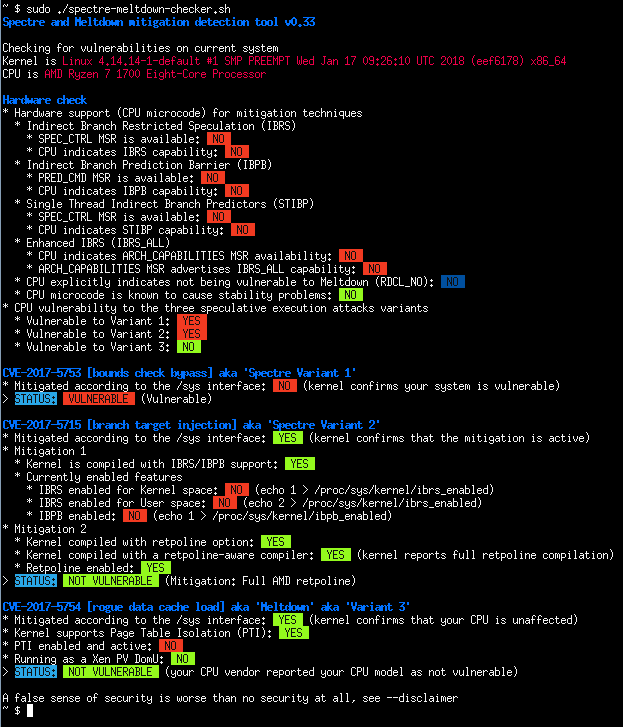
|
||||
|
||||
- Batch mode (JSON flavor)
|
||||
|
||||

|
||||
|
||||
## Quick summary of the CVEs
|
||||
|
||||
**CVE-2017-5753** bounds check bypass (Spectre Variant 1)
|
||||
|
||||
- Impact: Kernel & all software
|
||||
- Mitigation: recompile software *and* kernel with a modified compiler that introduces the LFENCE opcode at the proper positions in the resulting code
|
||||
- Performance impact of the mitigation: negligible
|
||||
|
||||
**CVE-2017-5715** branch target injection (Spectre Variant 2)
|
||||
|
||||
- Impact: Kernel
|
||||
- Mitigation 1: new opcode via microcode update that should be used by up to date compilers to protect the BTB (by flushing indirect branch predictors)
|
||||
- Mitigation 2: introducing "retpoline" into compilers, and recompile software/OS with it
|
||||
- Performance impact of the mitigation: high for mitigation 1, medium for mitigation 2, depending on your CPU
|
||||
|
||||
**CVE-2017-5754** rogue data cache load (Meltdown)
|
||||
|
||||
- Impact: Kernel
|
||||
- Mitigation: updated kernel (with PTI/KPTI patches), updating the kernel is enough
|
||||
- Performance impact of the mitigation: low to medium
|
||||
|
||||
**CVE-2018-3640** rogue system register read (Variant 3a)
|
||||
|
||||
- Impact: TBC
|
||||
- Mitigation: microcode update only
|
||||
- Performance impact of the mitigation: negligible
|
||||
|
||||
**CVE-2018-3639** speculative store bypass (Variant 4)
|
||||
|
||||
- Impact: software using JIT (no known exploitation against kernel)
|
||||
- Mitigation: microcode update + kernel update making possible for affected software to protect itself
|
||||
- Performance impact of the mitigation: low to medium
|
||||
|
||||
**CVE-2018-3615** l1 terminal fault (Foreshadow-NG SGX)
|
||||
|
||||
- Impact: Kernel & all software (any physical memory address in the system)
|
||||
- Mitigation: microcode update
|
||||
- Performance impact of the mitigation: negligible
|
||||
|
||||
**CVE-2018-3620** l1 terminal fault (Foreshadow-NG SMM)
|
||||
|
||||
- Impact: Kernel & System management mode
|
||||
- Mitigation: updated kernel (with PTE inversion)
|
||||
- Performance impact of the mitigation: negligible
|
||||
|
||||
**CVE-2018-3646** l1 terminal fault (Foreshadow-NG VMM)
|
||||
|
||||
- Impact: Virtualization software and Virtual Machine Monitors
|
||||
- Mitigation: disable ept (extended page tables), disable hyper-threading (SMT), or updated kernel (with L1d flush)
|
||||
- Performance impact of the mitigation: low to significant
|
||||
|
||||
**CVE-2018-12126** [MSBDS] Microarchitectural Store Buffer Data Sampling (Fallout)
|
||||
|
||||
**CVE-2018-12130** [MFBDS] Microarchitectural Fill Buffer Data Sampling (ZombieLoad)
|
||||
|
||||
**CVE-2018-12127** [MLPDS] Microarchitectural Load Port Data Sampling (RIDL)
|
||||
|
||||
**CVE-2019-11091** [MDSUM] Microarchitectural Data Sampling Uncacheable Memory (RIDL)
|
||||
|
||||
- Note: These 4 CVEs are similar and collectively named "MDS" vulnerabilities, the mitigation is identical for all
|
||||
- Impact: Kernel
|
||||
- Mitigation: microcode update + kernel update making possible to protect various CPU internal buffers from unprivileged speculative access to data
|
||||
- Performance impact of the mitigation: low to significant
|
||||
|
||||
**CVE-2019-11135** TSX Asynchronous Abort (TAA, ZombieLoad V2)
|
||||
|
||||
- Impact: Kernel
|
||||
- Mitigation: microcode update + kernel update making possible to protect various CPU internal buffers from unprivileged speculative access to data
|
||||
- Performance impact of the mitigation: low to significant
|
||||
|
||||
**CVE-2018-12207** machine check exception on page size changes (No eXcuses, iTLB Multihit)
|
||||
|
||||
- Impact: Virtualization software and Virtual Machine Monitors
|
||||
- Mitigation: disable hugepages use in hypervisor, or update hypervisor to benefit from mitigation
|
||||
- Performance impact of the mitigation: low to significant
|
||||
|
||||
**CVE-2020-0543** Special Register Buffer Data Sampling (SRBDS)
|
||||
|
||||
- Impact: Kernel
|
||||
- Mitigation: microcode update + kernel update helping to protect various CPU internal buffers from unprivileged speculative access to data
|
||||
- Performance impact of the mitigation: low
|
||||
|
||||
**CVE-2022-40982** Gather Data Sampling (GDS, Downfall)
|
||||
|
||||
- Impact: Kernel & all software
|
||||
- Mitigation: either microcode update or disabling AVX feature
|
||||
- Performance impact of the mitigation: TBD
|
||||
|
||||
**CVE-2023-20569** Return Address Security (Inception)
|
||||
|
||||
- Impact: Kernel & all software
|
||||
- Mitigation: updated kernel & microcode
|
||||
- Performance impact of the mitigation: low to significant depending on the mitigation
|
||||
|
||||
**CVE-2023-20593** Cross-Process Information Leak (Zenbleed)
|
||||
|
||||
- Impact: Kernel & all software
|
||||
- Mitigation: either kernel mitigation by disabling a CPU optimization through an MSR bit, or CPU microcode mitigation
|
||||
- Performance impact of the mitigation: TBD
|
||||
|
||||
**CVE-2023-23583** Redundant Prefix issue (Reptar)
|
||||
|
||||
- Impact: All software
|
||||
- Mitigation: microcode update for the affected CPU
|
||||
- Performance impact of the mitigation: low
|
||||
|
||||
@@ -0,0 +1,13 @@
|
||||
services:
|
||||
spectre-meltdown-checker:
|
||||
build:
|
||||
context: ./
|
||||
dockerfile: ./Dockerfile
|
||||
image: spectre-meltdown-checker:latest
|
||||
container_name: spectre-meltdown-checker
|
||||
privileged: true
|
||||
network_mode: none
|
||||
volumes:
|
||||
- /boot:/boot:ro
|
||||
- /dev/cpu:/dev/cpu:ro
|
||||
- /lib/modules:/lib/modules:ro
|
||||
+7463
-123
File diff suppressed because it is too large
Load Diff
Reference in New Issue
Block a user